Dental practice software

The front desk that never misses a call

An AI voice receptionist built for dental practices: it answers, books, escalates real emergencies and hands a clean summary to your staff, day, night and weekend. Configured around one practice's own hours, treatments, insurance list and emergency protocol, not a generic script.

Dental SaaSNext.js 15Retell AIStripe Billing

Live at dentraxai.com

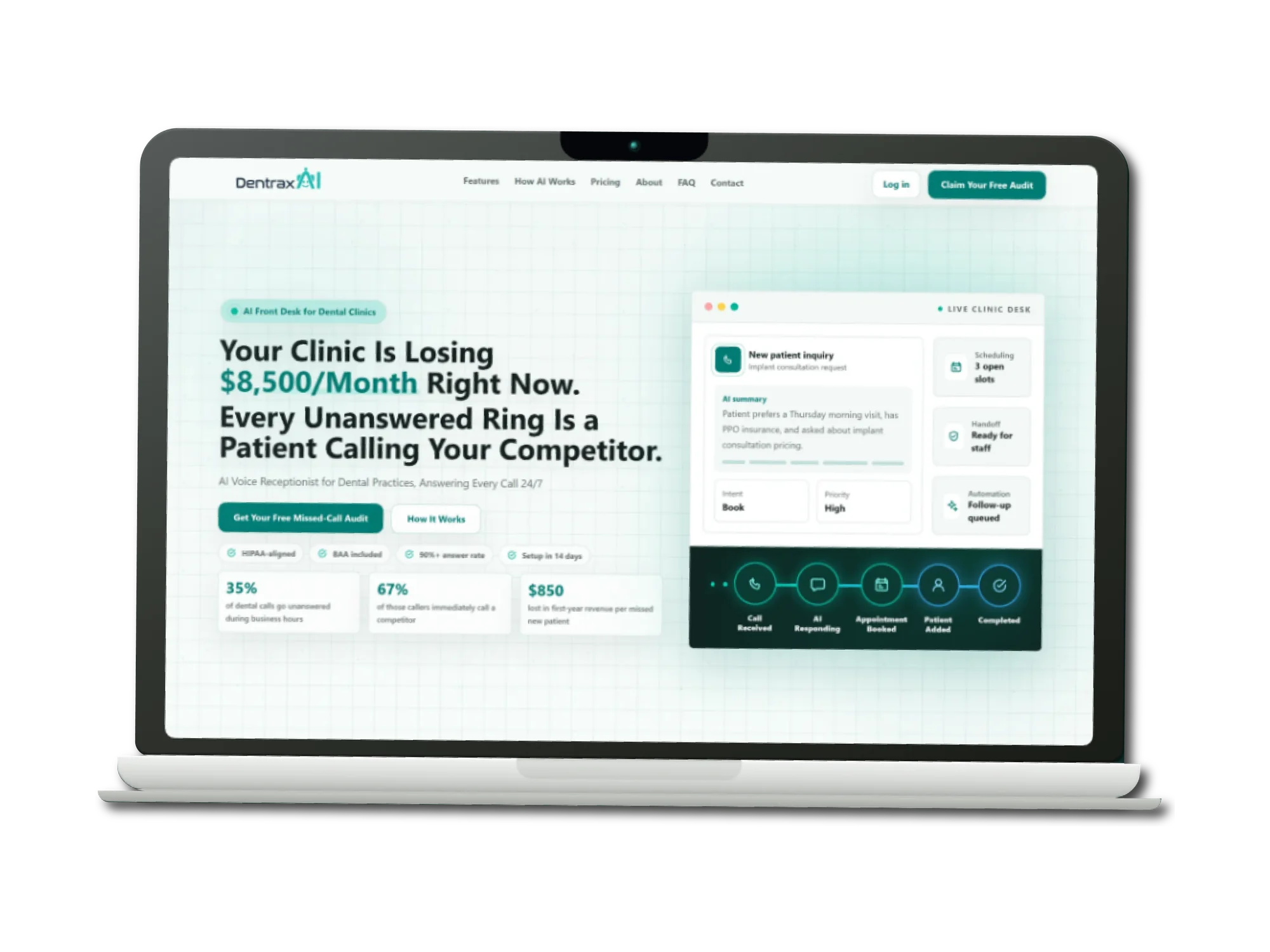
DentraxAI shown across a laptop and two browser windows
About the product

The front desk that never misses a call

Dental practices lose new patients in the gap between a phone ringing and somebody picking it up. The front desk is busy with the patient in the chair, the call goes to voicemail, and the caller simply dials the next practice. The brief was software that could hold that line: not a call-centre subscription, but a voice agent configured around one clinic's own hours, services, insurance list and emergency protocol.

DentraxAI is a single Next.js application carrying the whole business: the public marketing site, a live voice demo an anonymous visitor can actually talk to, Stripe checkout, account provisioning, a six-part clinic onboarding questionnaire, the practice dashboard, and an internal console for recovering failed purchases. There is no separate backend service. Postgres, auth and row-level security come from Supabase, and the Stripe, Resend and Airtable integrations are written directly against their REST APIs rather than pulled in as SDKs.

The decision that shaped the build was putting payment before account creation. A practice owner ready to buy is not asked to sign up first: they type a work email into the plan card and go straight to Stripe. Everything else, the auth user, the clinic, the subscription record and the setup email, is assembled afterwards from the Stripe webhook, which is treated as the only source of truth. Once inside, the practice answers six parts of a questionnaire that become the agent's knowledge, then watches real calls arrive on a dashboard that separates the ones it would have missed entirely.

Industry
Dental care and healthcare SaaS
Platform
Responsive web app: marketing site, clinic workspace and admin console in one deployment
Timeline
About fifteen weeks, April to August 2026
Team
One developer

What we did

  • Frontend development
  • Backend development
  • Database design
  • Third-party integrations
  • SEO and analytics instrumentation

Stack

Next.js 15React 19TypeScriptTailwind CSSSupabaseStripe BillingRetell AIResendAirtableVercel
Goals

What the build had to achieve

Sell before signup

Every form between a ready buyer and their card is a place to lose them. An anonymous visitor had to be able to pay first and receive an account afterwards, which pushes all the hard work onto the webhook, where a customer who has already paid must never end up without access.

Let the product speak for itself

Voice is impossible to evaluate from a screenshot, so the site had to let a visitor talk to the real agent before buying. Capped, rate-limited and lead-captured, but genuinely the same receptionist a patient would reach.

Configure around one practice

A dental agent is only credible if it knows this clinic's hours, treatments, insurance list, software and emergency rules. Onboarding had to capture that in a form a practice manager can actually finish, saving after every part rather than demanding one long sitting.

Prove the value that was invisible

The calls a practice never knew about are the whole argument for the product. The dashboard had to count them specifically, from the agent's own post-call analysis rather than from anything self-reported.

Inside the product

DentraxAI, screen by screen

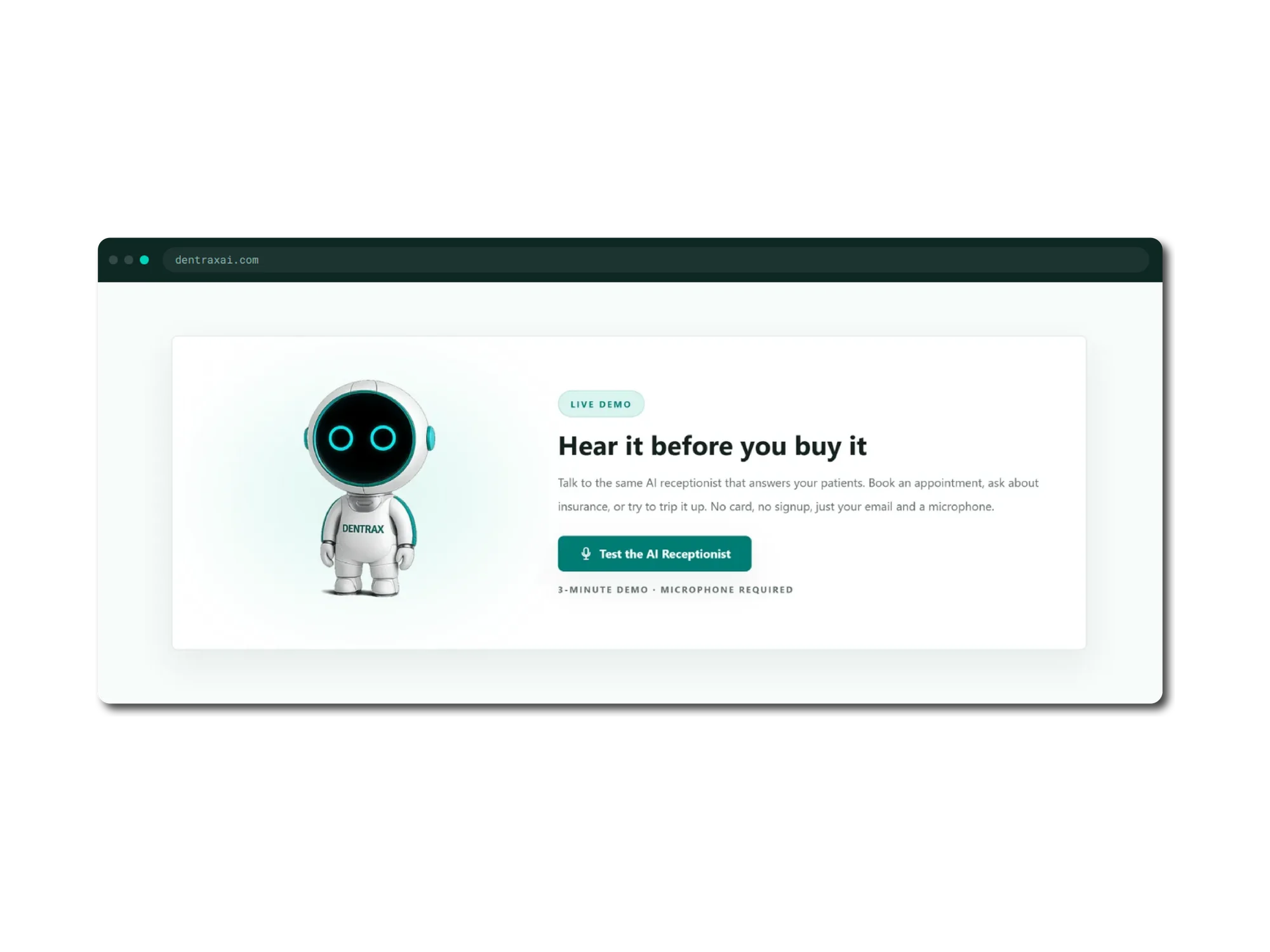
A browser window on dentraxai.com showing a live demo panel. A white robot mascot with glowing teal eyes and DENTRAX across its chest stands beside a heading reading Hear it before you buy it, with copy inviting the visitor to talk to the same AI receptionist that answers their patients, book an appointment, ask about insurance or try to trip it up, with no card and no signup. A teal button reads Test the AI Receptionist, above a note reading three-minute demo, microphone required.
01

Hear it before you buy it

Voice cannot be judged from a screenshot, so the homepage hands visitors a microphone. One email address starts a real three-minute call with the same agent a patient would reach. No card, no account.

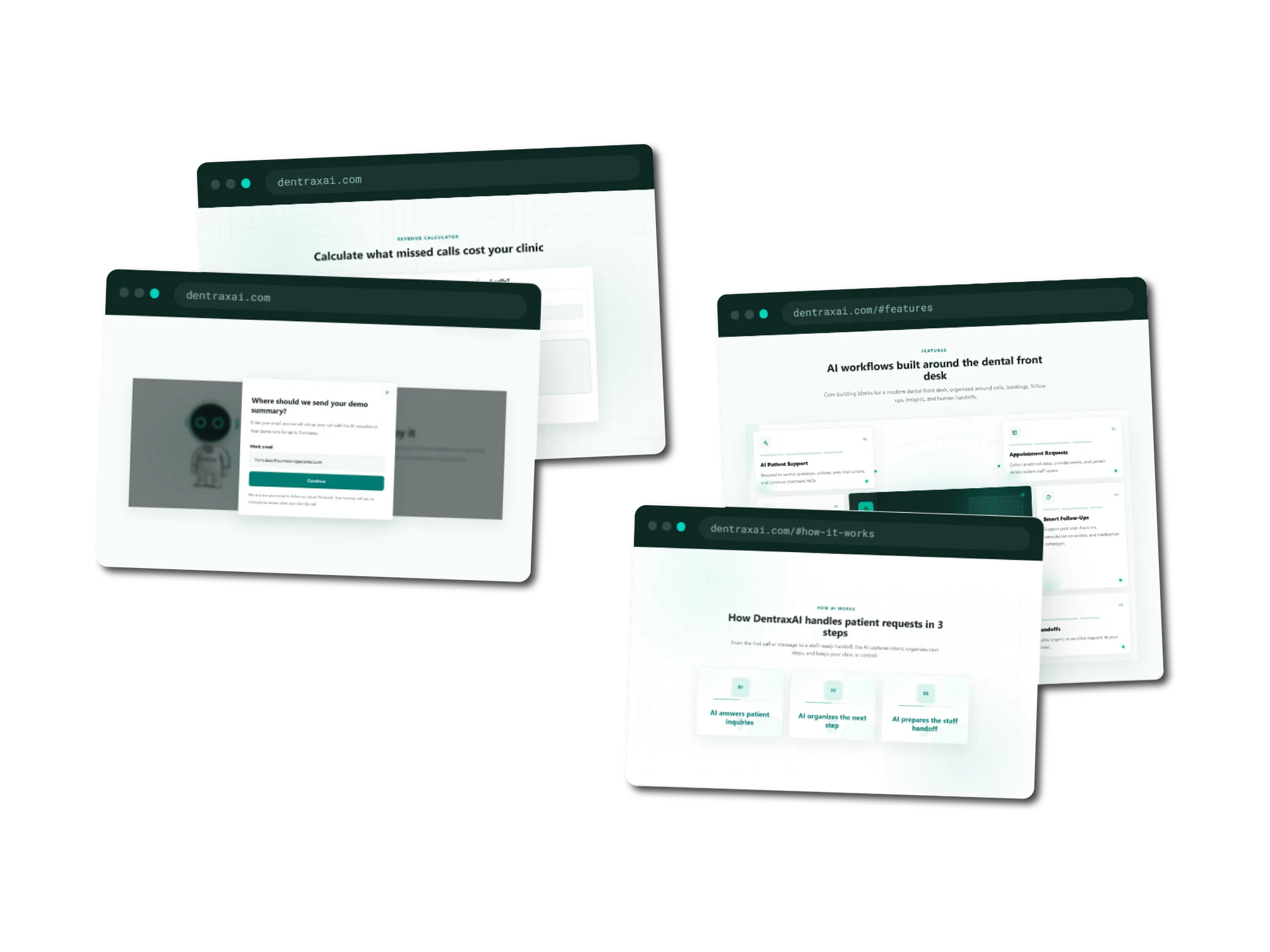
Four overlapping browser windows on dentraxai.com. One shows a revenue calculator headed Calculate what missed calls cost your clinic. One shows a modal asking where should we send your demo summary, with a work email field and a Continue button over a dimmed page. One shows a features section headed AI workflows built around the dental front desk, with cards for AI Patient Support, Appointment Requests and Smart Follow-Ups. The last shows a section headed How DentraxAI handles patient requests in 3 steps, with numbered cards reading AI answers patient inquiries, AI organizes the next step, and AI prepares the staff handoff.
02

The argument for the product

A calculator that turns a practice's own call volume into the revenue it is losing, the single email field that starts the demo, and the three-step path from a ringing phone to a staff-ready handoff.

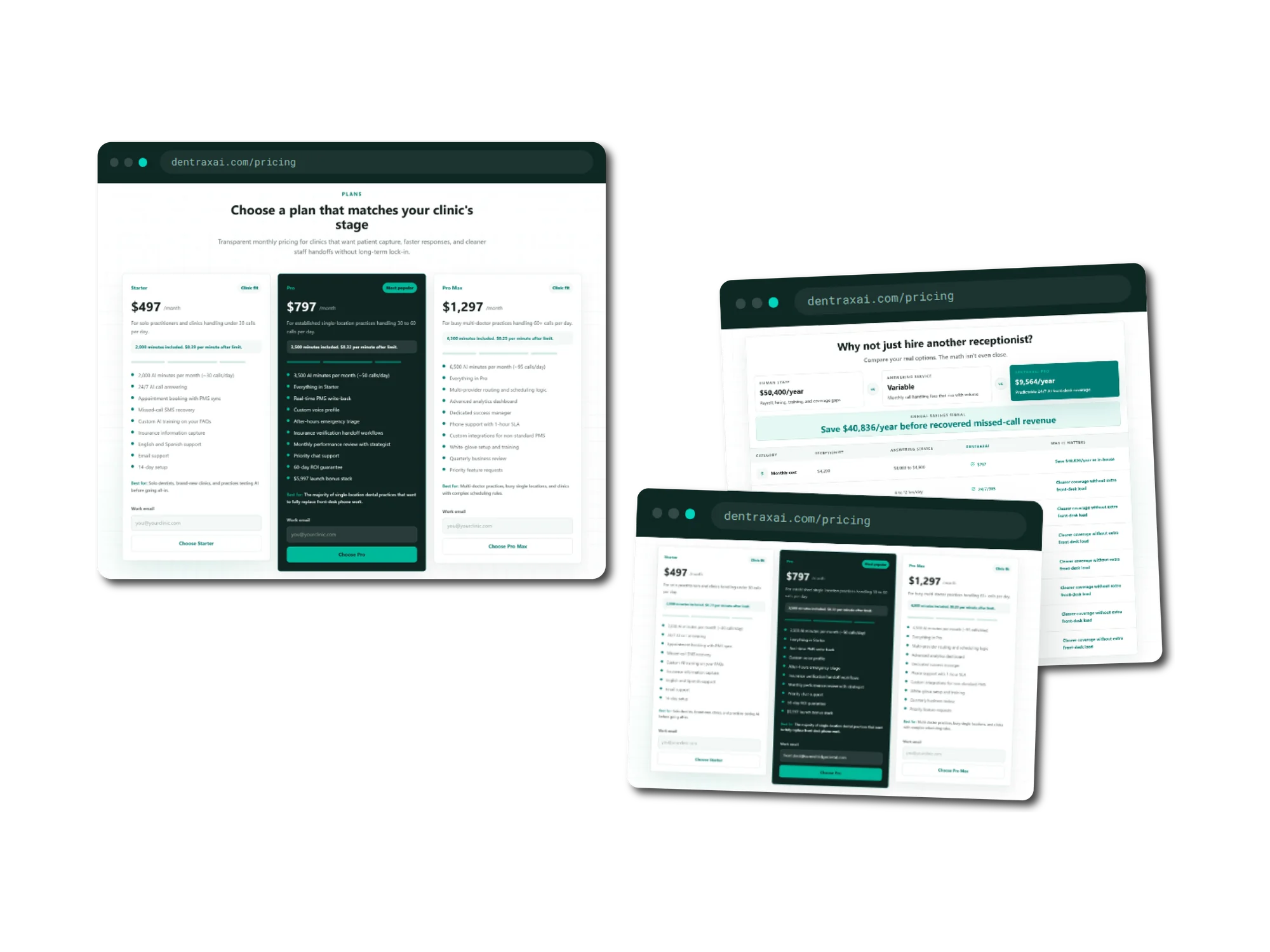
Two browser windows on the dentraxai.com pricing page. The first shows three plans under a heading reading Choose a plan that matches your clinic's stage: Starter at 497 dollars a month for clinics under 30 calls a day, Pro at 797 dollars a month marked most popular, and Pro Max at 1,297 dollars a month for practices handling 60 or more calls a day, each listing included AI minutes and the per-minute rate beyond them, and each carrying a work email field above its choose button. The second window is headed Why not just hire another receptionist, comparing human staff at 50,400 dollars a year and a variable-cost answering service against DentraxAI Pro at 9,564 dollars a year, with a banner reading save 40,836 dollars a year before recovered missed-call revenue.
03

Priced against the alternative

Three plans framed by daily call volume, each stating its included AI minutes and the per-minute rate beyond them. Beside them, the same money set against hiring a receptionist or retaining an answering service.

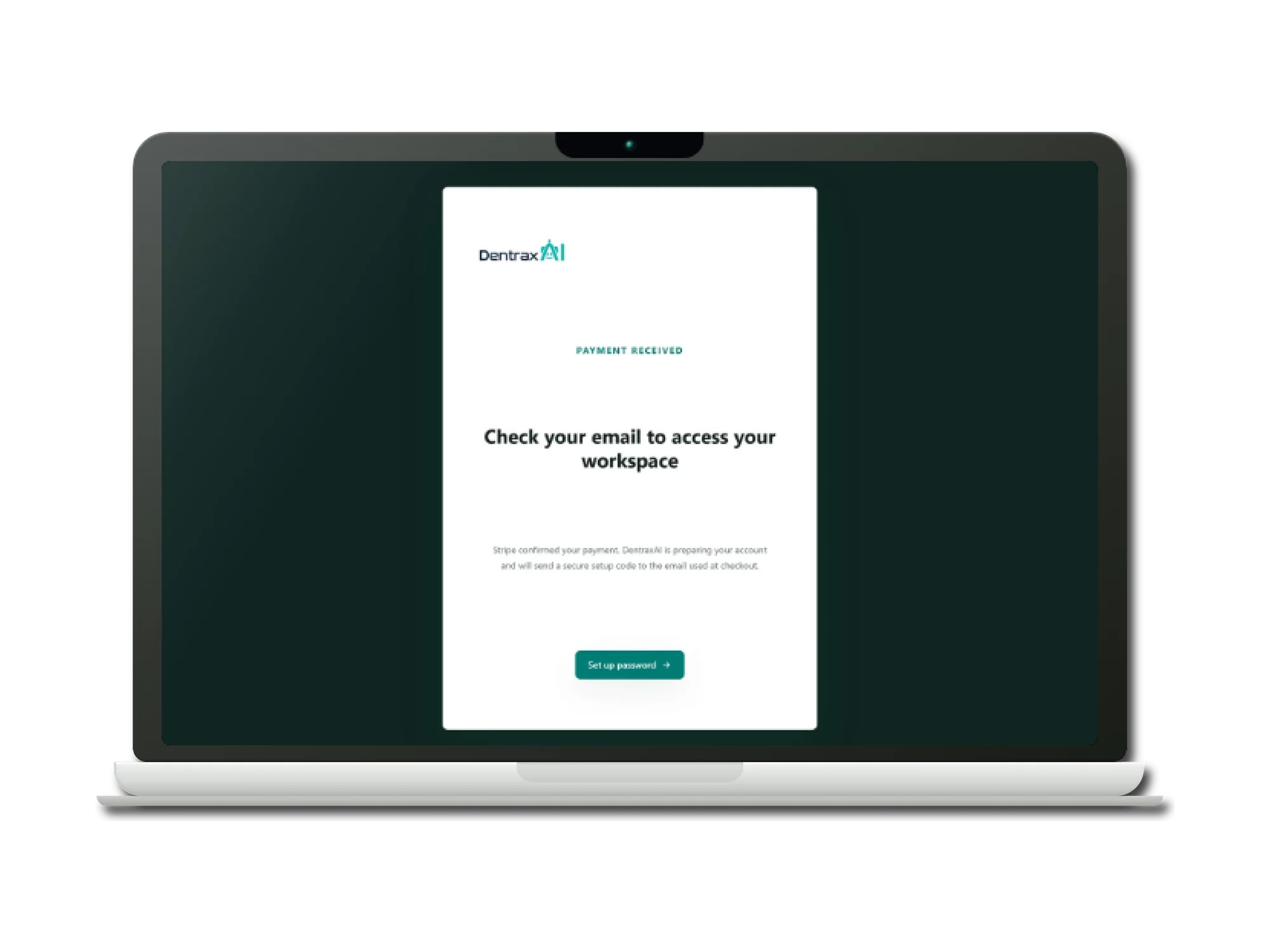
A laptop showing the DentraxAI checkout success page. A teal eyebrow reads Payment received above a heading reading Check your email to access your workspace, with copy explaining that Stripe confirmed the payment and that DentraxAI is preparing the account and will send a secure setup code to the email used at checkout. A teal button beneath reads Set up password.
04

Payment received

Buying happens before any account exists. The success page promises only what the webhook has actually done, then points the buyer at the one-time code that will let them set their own password.

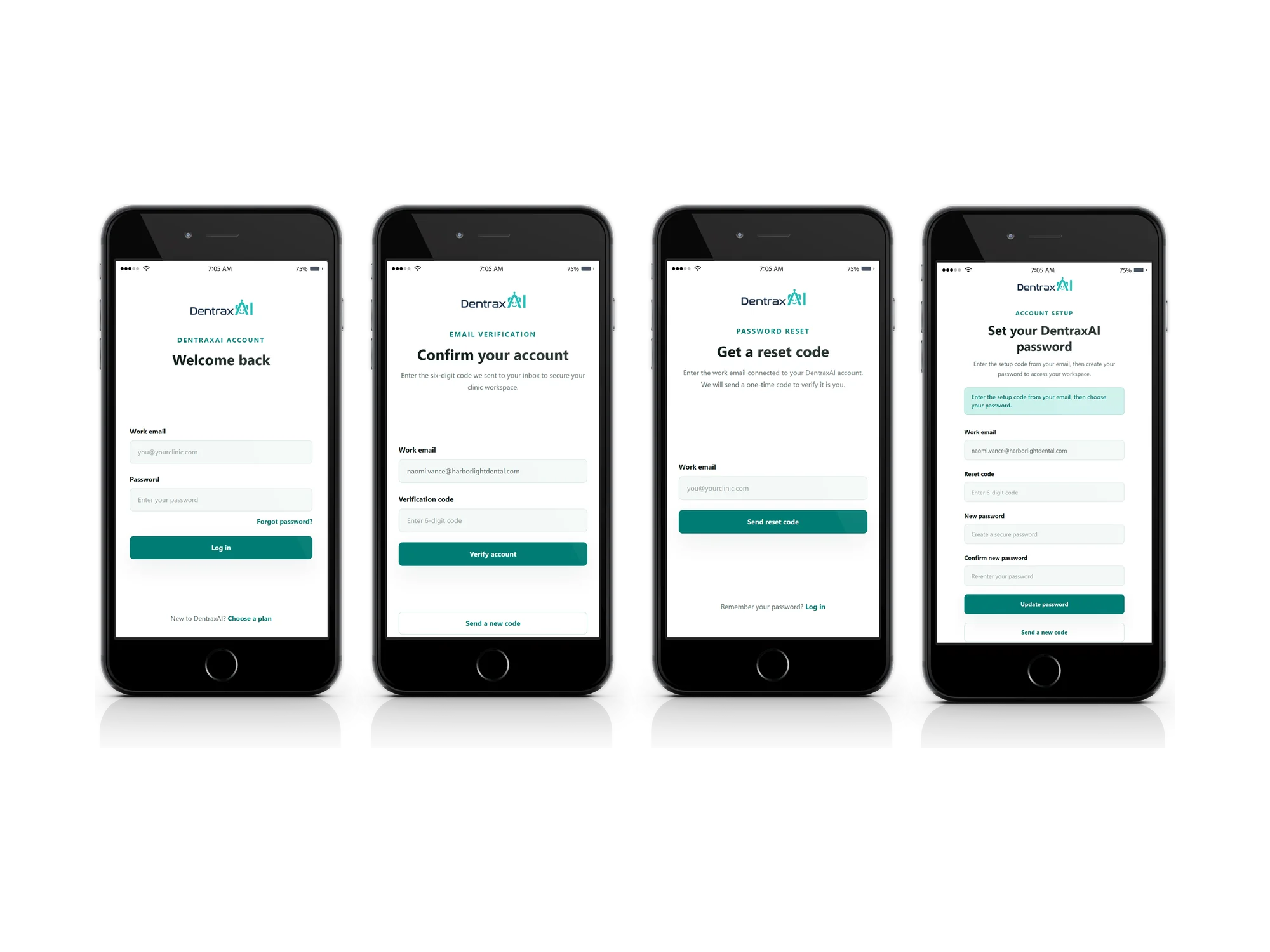
Four phones side by side showing DentraxAI account screens. The first is a log in screen with work email and password fields and a forgot password link. The second is headed Confirm your account, asking for the six-digit code sent to the inbox, with a resend option. The third is headed Get a reset code, asking for the work email connected to the account. The fourth is headed Set your DentraxAI password, with fields for work email, reset code, new password and confirmation, and a note to enter the setup code from the email before choosing a password.
05

Every route in is a code

Because accounts are created for people who never chose a credential, no password is ever generated or emailed. One hashed one-time-code path serves first-time setup, email verification and password recovery alike.

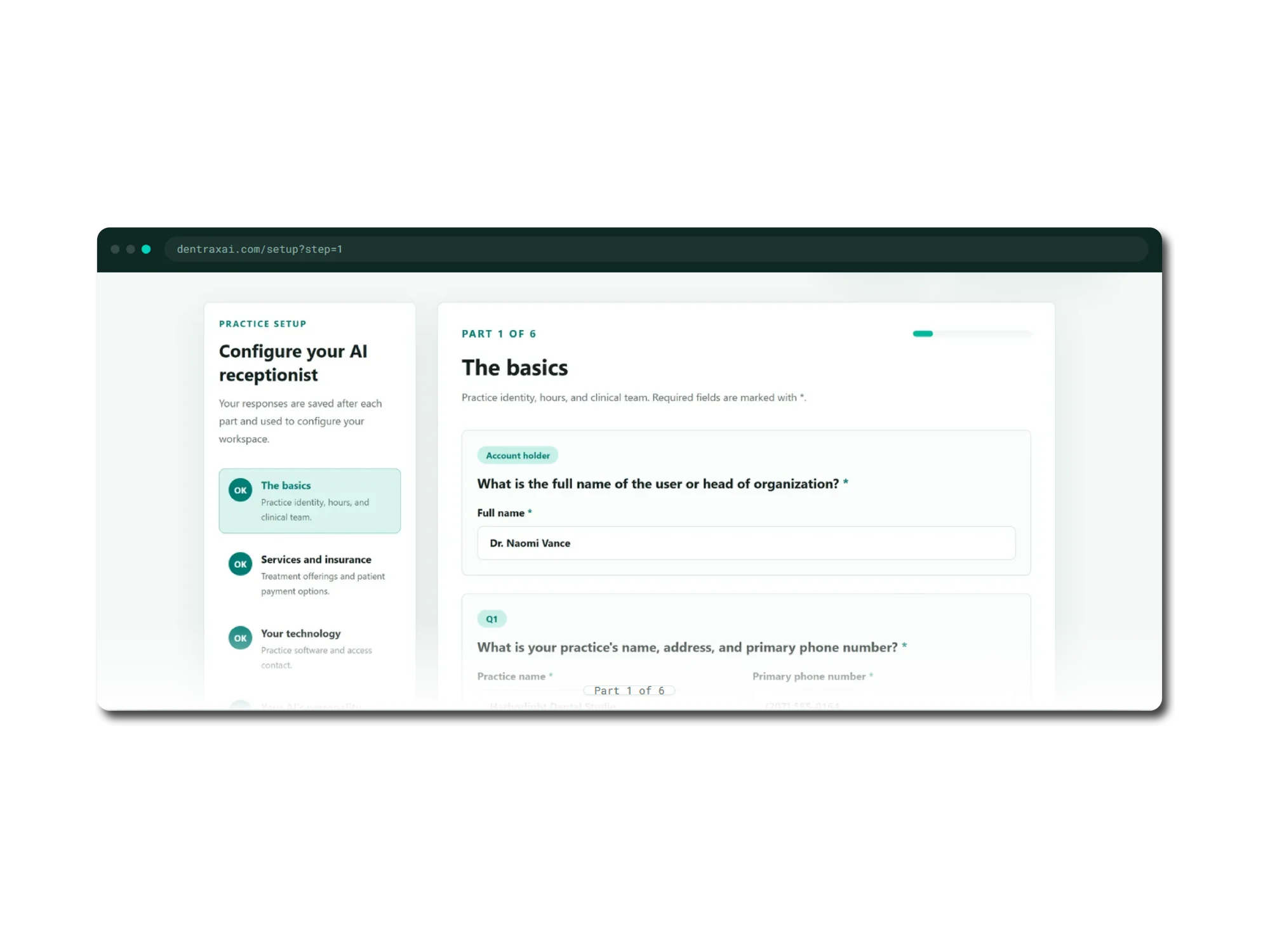
A browser window at dentraxai.com/setup showing the practice setup questionnaire. A left rail headed Configure your AI receptionist lists the parts, The basics, Services and insurance, Your technology, Your AI's personality, Emergencies and escalation and Final step, each with a completion marker, with The basics highlighted. The main pane is headed Part 1 of 6, The basics, covering practice identity, hours and clinical team, with a progress bar and fields for the account holder's full name and the practice name, address and primary phone number.
06

Configuring one practice

A dental agent is only credible if it knows this clinic. Six parts capture identity, hours, treatments, insurance, software, tone and emergency protocol, saving after each one rather than demanding a single sitting.

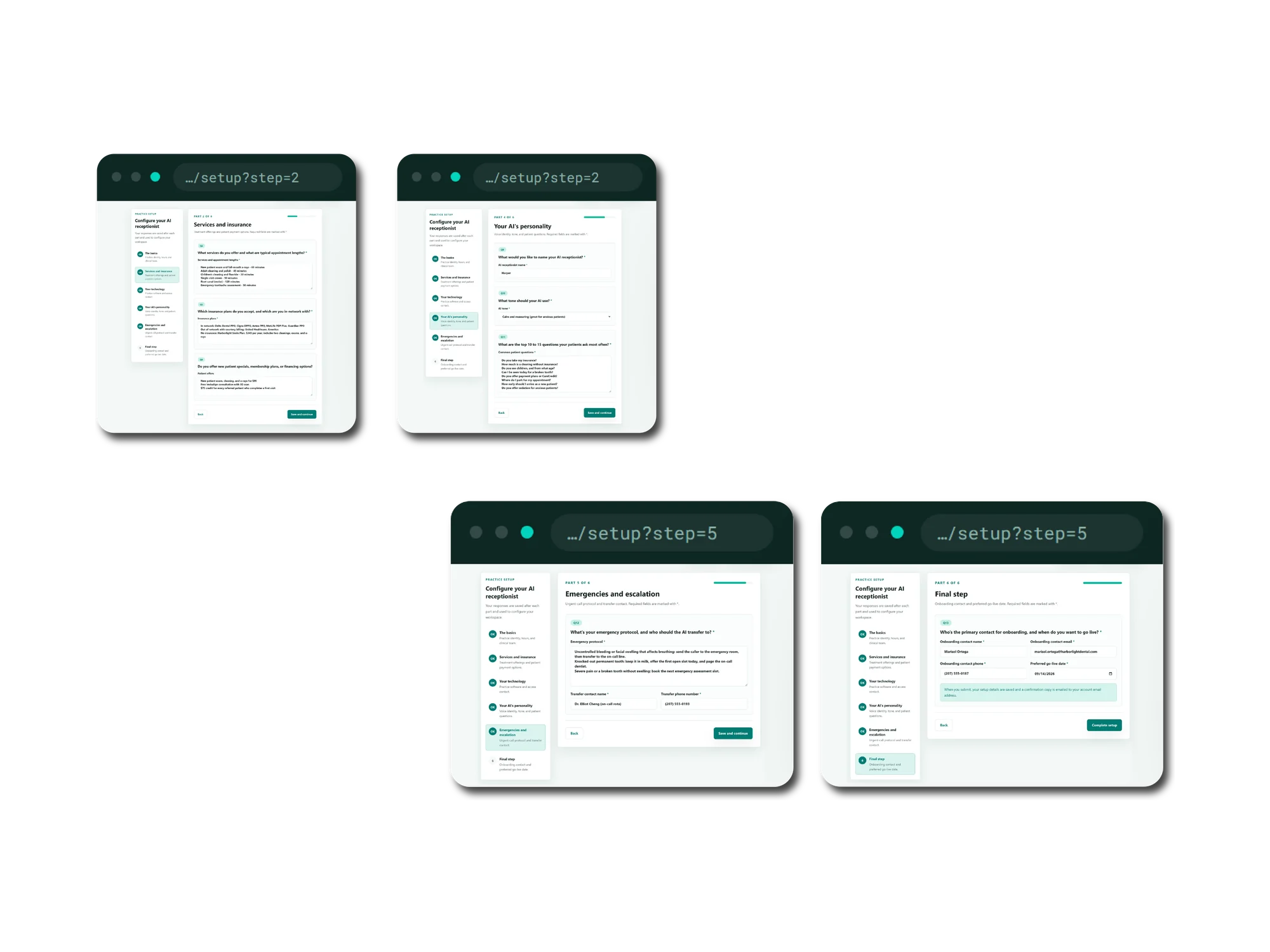
Four browser windows showing later parts of the DentraxAI setup questionnaire. Part 2, Services and insurance, lists treatments with appointment lengths and accepted in-network plans. Part 4, Your AI's personality, sets the receptionist's name to Harper, a calm and reassuring tone for anxious patients, and a list of the questions patients ask most often. Part 5, Emergencies and escalation, gives an emergency protocol covering uncontrolled bleeding, a knocked-out permanent tooth and severe pain, with a named transfer contact and phone number. Part 6, Final step, collects the onboarding contact and a preferred go-live date.
07

What the agent is told

Treatments with their appointment lengths, the in-network insurance list, the agent's name and tone, and the emergency protocol with the person it transfers to. The hours entered here are what later decide whether a call counts as after-hours.

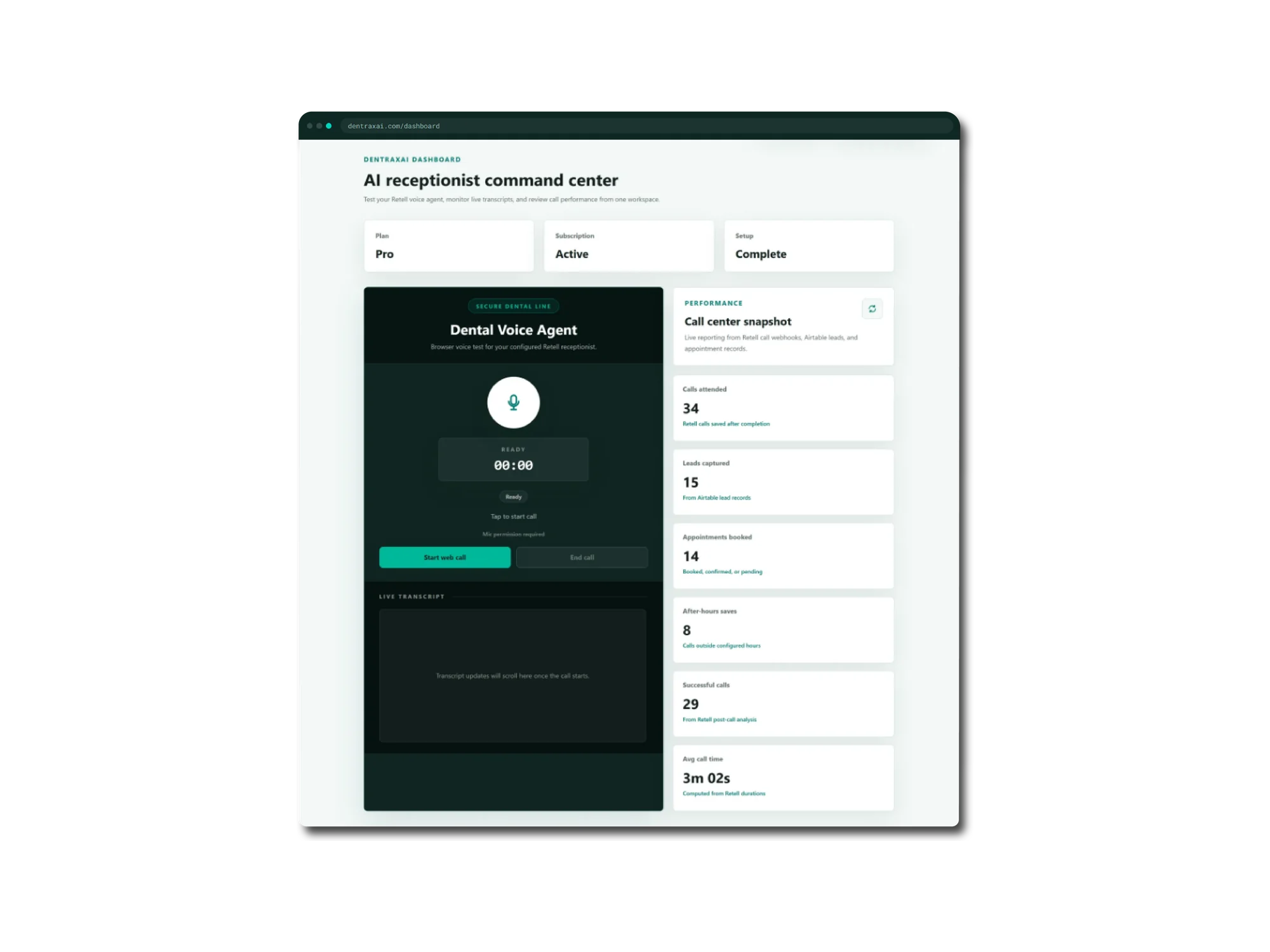
A browser window at dentraxai.com/dashboard headed AI receptionist command center. Tiles across the top show the plan as Pro, the subscription as Active and setup as Complete. A dark panel headed Dental Voice Agent offers a browser voice test with a microphone button, a ready timer at zero, start and end call buttons and an empty live transcript pane. A performance column headed Call center snapshot reports 34 calls attended, 15 leads captured, 14 appointments booked, 8 after-hours saves for calls outside configured hours, 29 successful calls from Retell post-call analysis, and an average call time of 3 minutes 2 seconds.
08

The calls you never knew about

Six tiles assembled from the agent's own post-call analysis rather than anything self-reported, including the after-hours saves that are the whole argument for the product. Beside them, a browser line the practice can use to call its own receptionist.

Challenges

The parts that were genuinely hard

01

A customer pays, and then something breaks

The problem

Once payment precedes account creation, the checkout webhook is the only thing standing between a paying customer and no account at all. Stripe redelivers webhooks, fires its checkout and subscription events in an unpredictable order, and a buyer can close the browser the moment the card clears. Provisioning is not one write: it is an auth user, a profile, a clinic, a setup record, a subscription row and an outbound email, six side effects with no shared transaction.

What we did

Every checkout became a first-class object in its own table with a lifecycle, from pending through retrying to completed, failed or needs support review, keyed by a unique Stripe session id. Replays short-circuit on records already completed, the whole provisioning body is wrapped so any throw writes the failure and its message to the record before re-raising, and a buyer whose clinic already has a different active subscription is parked for review rather than silently double-provisioned.

The outcome

Every paid checkout is visible, diagnosable and recoverable from an internal console, with retry, resend and reopen. Retry re-fetches the live Stripe session rather than trusting stored state.
02

Never emailing a password

The problem

The purchase-first flow creates accounts for people who have never chosen a credential. The obvious shortcut is to generate a password and email it, which leaves a working credential sitting in an inbox forever. The design document rejected it explicitly as not worth the security and trust risk.

What we did

The account is created with a throwaway 32-byte random password that is never transmitted, and the buyer receives a one-time setup code instead. The same machinery serves verification, password reset and post-purchase setup: codes generated with a CSPRNG, stored only as HMAC digests, compared with a timing-safe equality check, expired after ten minutes, capped at five attempts and rate-limited to one resend every ninety seconds.

The outcome

No reusable secret ever leaves the system by email, and one code path covers three separate journeys.

03

Two webhooks per call, arriving in either order

The problem

The voice platform reports each call twice: one delivery carries the transcript and timing, a second carries sentiment, summary and the success verdict. They are separate deliveries and either can arrive first or be redelivered. A naive upsert lets a late first event overwrite an analysis that already landed, quietly wiping the successful-call verdict the dashboard counts.

What we did

The handler reads the existing row first and merges by event type, so analysis fields are written only by the analysis event and otherwise carried forward from what is already stored. The upsert is keyed on a unique call id so redelivery is a no-op, the payload signature is verified with a timing-safe HMAC inside a five-minute window, and calls whose metadata carries no clinic id are acknowledged and skipped.

The outcome

Call telemetry that is correct regardless of delivery order, and a public demo line that cannot pollute a clinic's numbers.

04

Turning a free-text hours box into a metric

The problem

After-hours saves is the tile that proves the product's value, and it depends on knowing when a clinic is shut. Practices type their hours as prose into a textarea: Monday to Thursday 8:00 AM to 6:00 PM, Sat 9-1, Sunday closed. The answer has to be computed in the clinic's own timezone, not the server's, with windows that can cross midnight.

What we did

A parser expands weekday ranges with wraparound, reads times with or without minutes and meridiem, inherits a missing start meridiem from the end one, evaluates the call time in the clinic's timezone, and handles windows that span midnight. Where hours are blank or unparseable it returns nothing at all rather than a guess.

The outcome

A metric that is either right or absent, never fabricated, backed by a partial index so the count stays cheap as call volume grows.

Approach

How the work ran

  1. 01

    Discovery and research

    The commercial mechanics were designed on paper before they were coded. A written plan worked through the purchase-first flow end to end: the source of truth, the account-creation approach, four existing-user cases and seven named edge cases, down to the recommended shape of the provisioning table. The final build follows it closely.

  2. 02

    UI/UX implementation

    The interface is built on a small custom design system rather than a component library: a named palette, two shadow tokens and a set of shared primitives, page chrome, section headings, cards, buttons and a scroll-reveal wrapper, reused across marketing, app and admin so the paid product looks continuous with the site that sold it.

  3. 03

    Development and delivery

    Work ran in tight functional slices, visible in the history as day-numbered schema migrations and features landing one flow at a time: auth and Stripe, then the questionnaire, then the voice agent, then dashboard statistics. Migrations were written to be re-runnable against a partially-applied database, and the Stripe work was proven against sandbox mode with the edge cases exercised deliberately before release.

  4. 04

    Deployment and support

    The app ships with configuration entirely in environment variables and no build-time coupling to a host. Analytics and search visibility were instrumented before launch: tag manager, GA4, full Open Graph and Twitter metadata, a canonical URL and a SoftwareApplication JSON-LD schema. Ongoing support is served by the provisioning console, which turns the worst-case billing failure into a two-click fix.

Features

What shipped

Live AI receptionist demo, no signup

An anonymous visitor gives one email address and talks to the real agent in the browser for up to three minutes, with a live transcript, while sales receives the lead. A honeypot field, a rolling per-IP limit and a slot release on failure keep the cost per visitor bounded without a captcha.

Purchase-first checkout with automatic provisioning

Plans are bought without an account. The webhook creates the auth user, profile, clinic, subscription and setup record, then emails a one-time setup code. Billing is managed afterwards through the Stripe customer portal.

Six-part clinic configuration

Identity and hours, services and insurance, practice software, agent personality and tone, emergency escalation and go-live details: 24 validated fields, saved after every part, with the practice's own management software chosen from Dentrix, Eaglesoft, Open Dental, Denticon, Curve Dental or Cloud 9.

Call telemetry with after-hours attribution

Every completed call is stored with transcript, duration, sentiment, summary, success verdict and the full raw payload, then rolled into six live tiles, including the calls that arrived while the practice was closed.

Browser test line for the practice

The clinic can call its own configured agent from the dashboard and watch the transcript stream in, with statistics refreshing automatically once the call ends.

Internal provisioning recovery console

An email-allowlisted admin view over every checkout, with the failure reason in plain text and one-click retry, resend and reopen.

Results

Measured, not estimated

94 / 100

Lighthouse performance

On the homepage, with a largest contentful paint of 0.7 seconds and cumulative layout shift of zero. Measured by us against a local production build, so it is our own measurement rather than field data.

102 kB

Shared First Load JS

Across the whole app, for a product carrying a real-time voice stack. The marketing homepage lands at 250 kB and the dashboard, where the voice client lives, at 244 kB.

9 tables

Row-level security

Enabled on every table, with each policy scoping rows to the clinic owner. Both webhook endpoints verify signatures with timing-safe comparison, and one-time codes are stored only as hashes.

Never miss another patient call

We build the AI systems that answer, qualify and book while your team stays with the patient in front of them.

Have a Project To Discuss?

Contact Us