




Real estate photography

The edit that used to take the evening

A web app that merges and grades a real estate photographer's brackets in one batch, then lets them refine any frame in the browser. Fourteen individually scoped enhancements, two brush tools, and a version history that never overwrites the last render.

Real estate mediaNode.jsStripeAI image pipeline

Live at homehdr.com

HomeHDR shown across a laptop and two browser windows
About the product

Listing-ready photos in the time it takes to drive to the next shoot

Real estate photography has a bottleneck that has nothing to do with photography. The shoot takes an hour; the edit takes the evening. Every property comes back as a stack of bracketed exposures that have to be merged, tone-mapped, colour-corrected, straightened, and cleaned of the things nobody wants in a listing: the photographer in the hallway mirror, a bin by the drive, a black rectangle where a television is. Photographers either lose their nights to it or send it out and wait a day per property.

HomeHDR removes that evening. A photographer creates a project, drops in between one and eight frames per shot, and the app merges and grades the whole set in one batch. What comes back is not a filter. Fourteen individually scoped enhancements sit behind the render, from window pull and sky replacement to virtual twilight, fire in the fireplace and realtor sign removal, each one a separate prompt module composed into a single instruction at render time. Two brush tools handle the rest: mask an object and it is erased, or mask a region and it is filled with plausible furniture.

Around that pipeline sits everything a working business needs. Projects and their photos are stored with a twenty-day retention window. Every render is kept as a version, so a photographer can compare, download or revert to any earlier one. Billing runs on Stripe with subscriptions, prepaid render credits, separate top-up credits for the brush tools, discount codes and admin-created bespoke plans. An admin console covers accounts, revenue, credit ledgers and support impersonation.

Industry
Real estate media and property marketing
Platform
Responsive web application plus a separate admin portal
Timeline
About six months, January to July 2026
Team
Dezy Solutions team

What we did

  • Frontend development
  • Backend development
  • Database design
  • AI pipeline integration
  • Payments
  • DevOps
  • Content system

Stack

Node.js 20ExpressSQLite with WALStripeCloudflare R2sharpexiftoolResendGoogle OAuthDockerRailway
Goals

What the build had to achieve

Photographic, not AI-looking

The whole product fails if the output looks generated. The render is constrained by an explicit rule set rather than left to the model's taste: mirrors are never treated as windows, every character of every sign and document stays identical, and geometry is untouched unless perspective correction is switched on.

A shoot at a time, not a photo at a time

The unit of work is a property, not an image. Upload the whole set, have it merged and graded in one pass, download the finished set as a ZIP. Anything that made a photographer repeat themselves per frame was treated as a defect.

Never lose work, never double-charge

A render costs the business real money on every call and the customer real money on every purchase. Both sides had to be exact: idempotent payment handling, atomic credit reservation, refunds on failure, and in-flight renders drained before a deploy takes the container down.

Self-serve end to end

A photographer should be able to arrive from a search result, sign up, render a set, hit their plan limit, buy credits and get an invoice without anyone from the team touching it. The admin console exists for exceptions, not for the normal path.

Inside the product

HomeHDR, screen by screen

A laptop showing the HomeHDR landing page, headed Professional Real Estate HDR Photo Editing, Instantly, with a draggable before and after slider over a photograph of a house, buttons reading Try 15 Free Edits and See Results, and three supporting points on RAW and JPEG input, AI-based HDR and 15 free edits. Two browser windows beside it show a features section headed Every tool your listings need, and a blog index headed Real estate photography, decoded, with category filters, a search field and a featured article on window pulls.
01

Proof before signup

The marketing site argues the case with the output rather than adjectives: a draggable before and after on the same property, every enhancement previewed on a real photo, and fourteen articles of editing guidance behind it.

Three tablets showing HomeHDR account screens. The first is a sign-in card with a Log In and Sign Up toggle, a Continue with Google button, email and password fields and a forgot password link. The second is the signup form with first and last name, an email field carrying its own Verify button, a password field with a live strength meter listing three requirements, and a confirm password field. The third is headed Reset your password, taking an email address to send a reset code to.
02

Getting in

Google or email and password on one card, a signup that verifies the address inline and scores password strength as it is typed, and a code-based recovery flow rate limited on both send and verify.

A laptop showing the HomeHDR workspace headed Welcome back, harper, with tiles for 9 projects, 74 photos and a quota reading 586 of 800 plus 760 top-up credits, buttons for New project and Top up credits, jump-back-in shortcuts to the most recently rendered and newest projects, a search field, and a grid of project cards each marked edited with a photo count and age. Two browser windows behind it show the same library and a New project dialog with a project name field and a dropzone stating the accepted formats and size cap.
03

A shoot at a time

The unit of work is a property, not an image. The library shows every project with its photo count and plan quota, and a new shoot is a name and a drop, with the accepted formats and size cap read from the server's own registry.

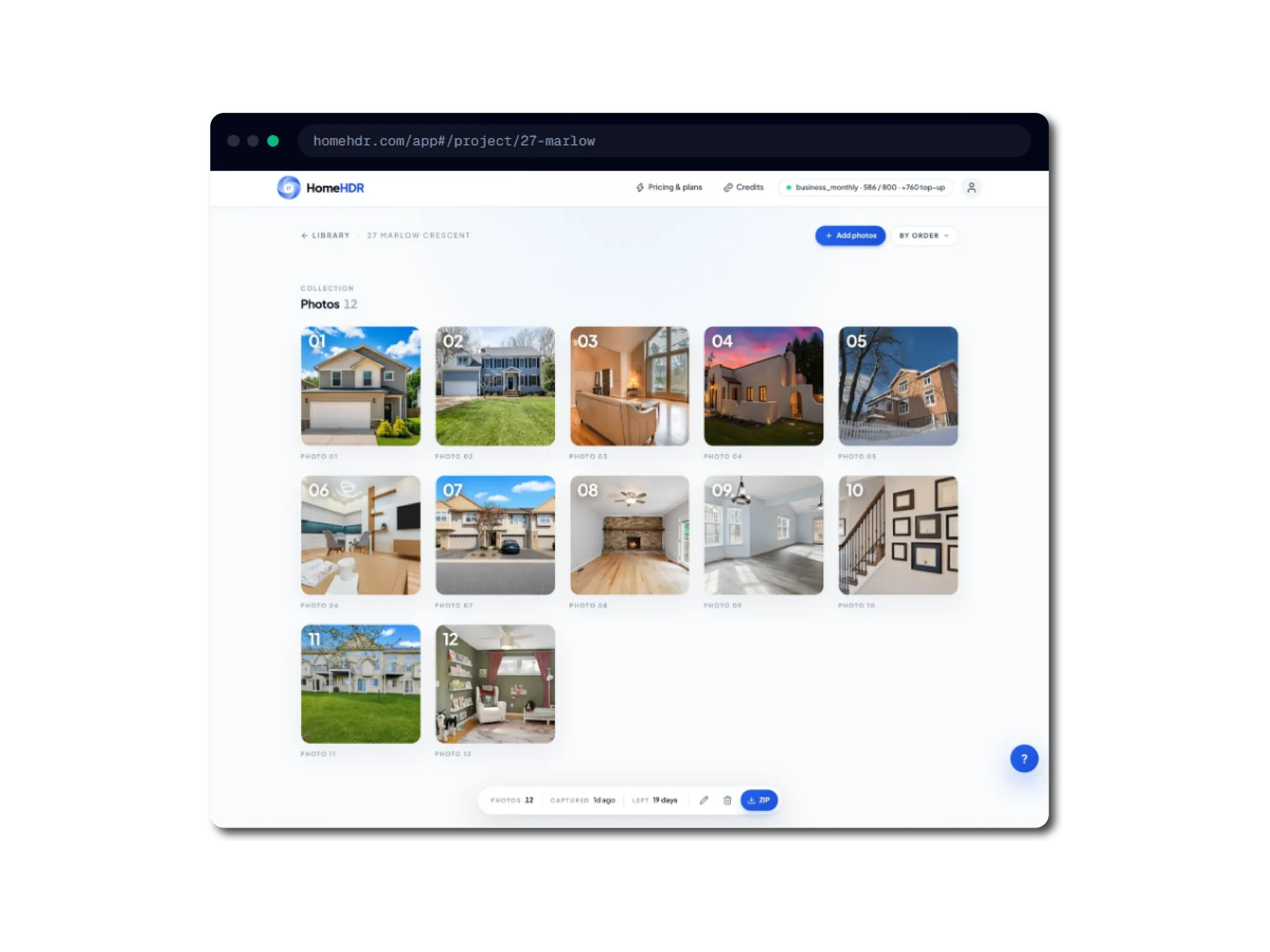
A browser window at the HomeHDR project view for 27 Marlow Crescent, headed Collection, Photos 12, showing twelve numbered thumbnails of a property in shoot order: exteriors, a living room, a twilight shot, a fireplace, a staircase and a study. A floating dock at the bottom reads photos 12, captured 1 day ago, left 19 days, with rename and delete icons and a blue ZIP download button.
04

The contact sheet

Every finished frame in shoot order, numbered, with a floating dock for rename, delete and a ZIP of the whole set. The twenty-day retention window is shown on the same bar, so nothing expires as a surprise.

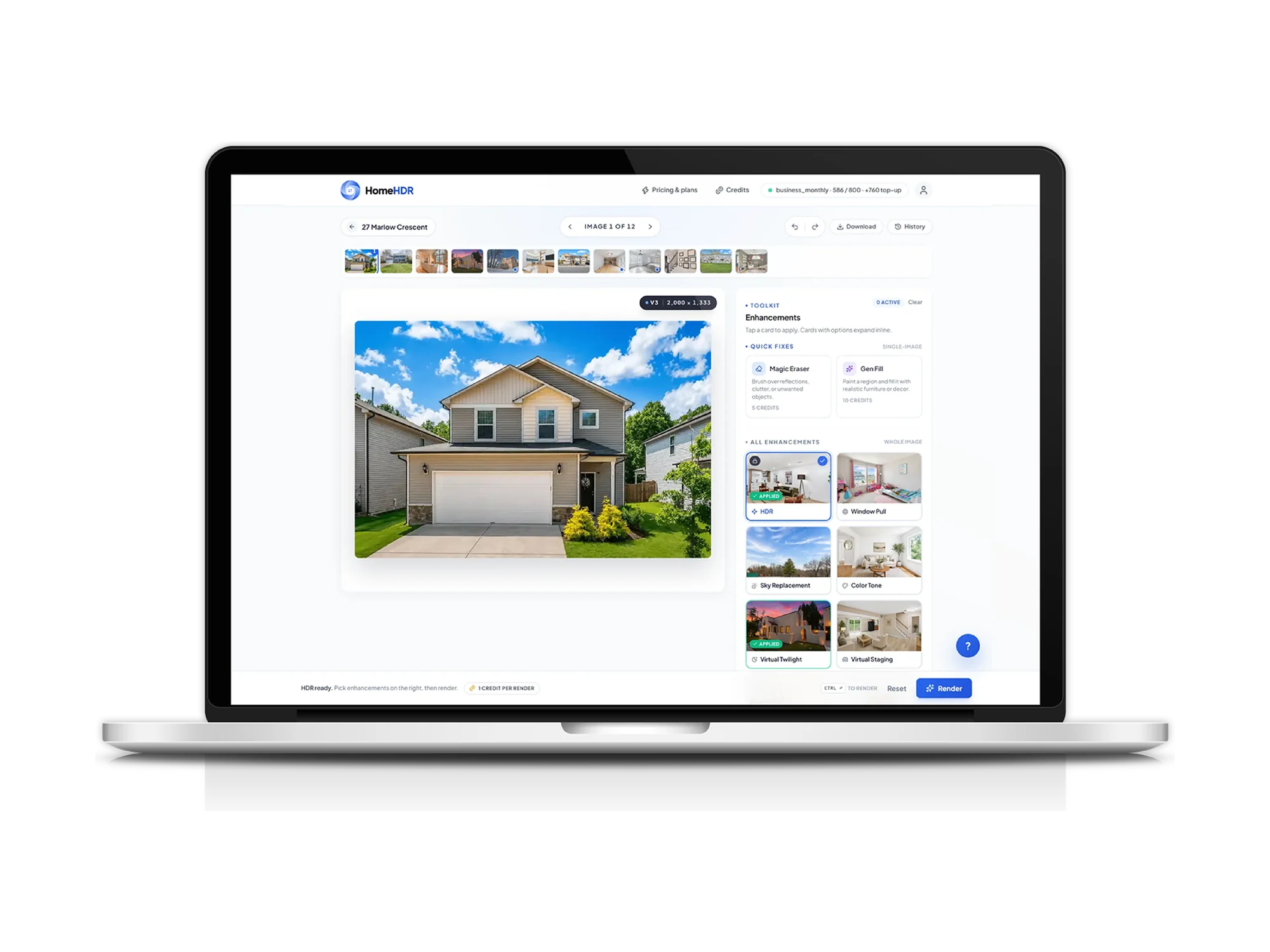
A laptop showing the HomeHDR photo editor: a filmstrip of twelve thumbnails above a rendered exterior photograph tagged version 3 at 2,000 by 1,333 pixels, with a toolkit panel on the right and a Render button reading one credit per render. A browser window beside it zooms into that toolkit, headed Enhancements, with Quick Fixes cards for Magic Eraser at 5 credits and Gen Fill at 10 credits, then an All Enhancements grid beginning with HDR, marked applied, and Window Pull, each card previewed on a real photograph, noted as fourteen enhancements that scroll further.
05

Fourteen scoped enhancements

Canvas, filmstrip and toolkit in one frame. Each enhancement is its own prompt module, active only when selected and scoped so it cannot touch anything it does not name, and each is previewed on a real photo with its credit cost.

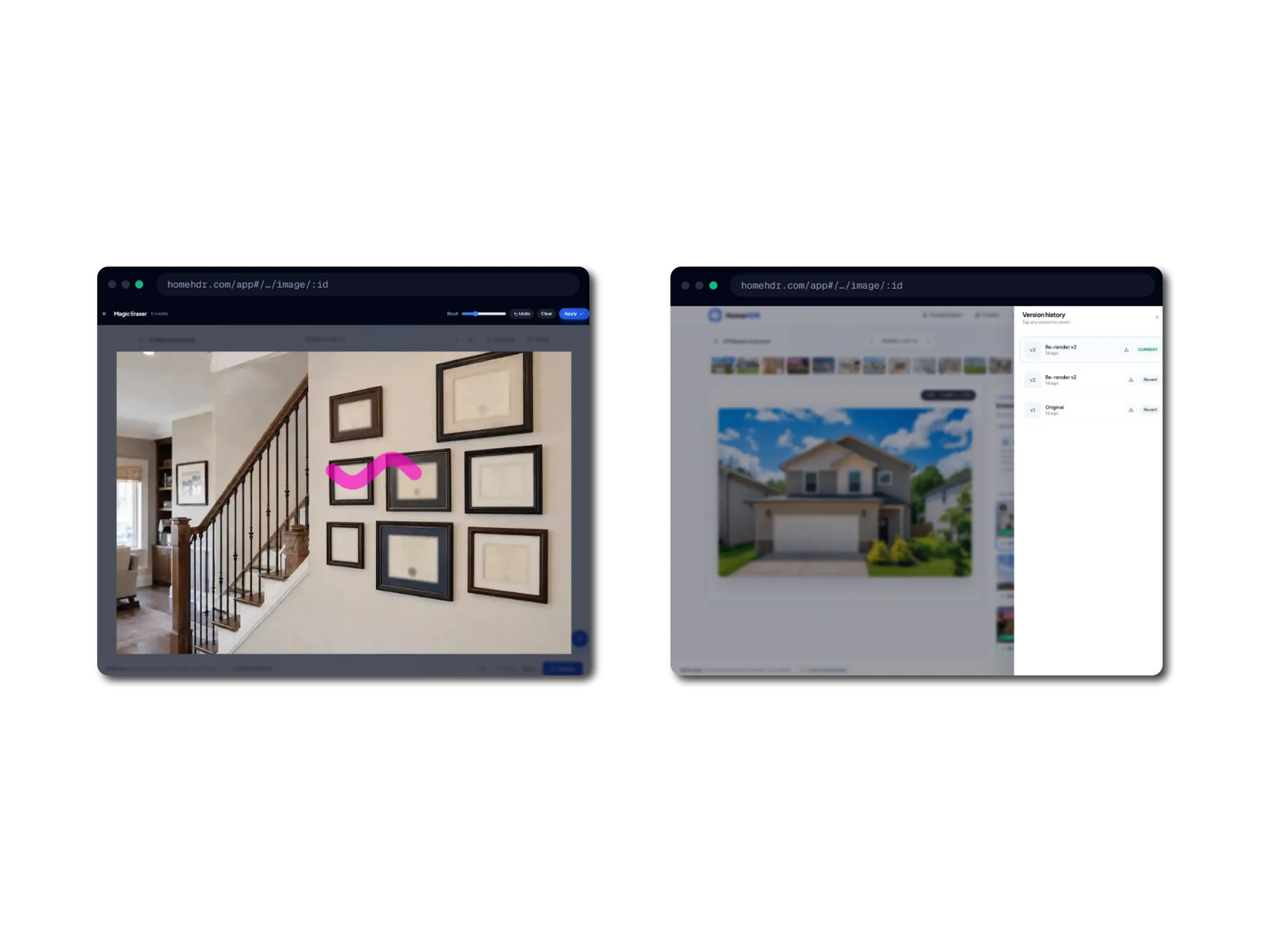
Two browser windows. The first shows the Magic Eraser open over a photograph of a staircase and a wall of framed pictures, with a pink brush stroke masking one frame, a brush size slider, and undo, clear and apply controls. The second shows a version history panel listing re-render v3 marked current, re-render v2 and the original v1, each with a download icon and the two earlier ones offering a revert action, over the dimmed editor behind it.
06

Brush it out, and step back

Mask an object and it is erased; the credit is only spent once the render lands. Every render writes a new version rather than overwriting the last, so any earlier one can be downloaded or restored.

A browser window at the HomeHDR credits page headed Top up your credits, explaining that credits are used in the editor for Magic Eraser at five credits a use and Gen Fill at ten, are bought once and never expire. A balance card shows 640 credits, equal to 128 Magic Eraser uses. Three packs follow: 500 credits for 8 dollars, 1,500 credits for 24 dollars marked most popular, and 5,000 credits for 80 dollars, each with its own buy button.
07

Credits that do not expire

The brush tools run on a separate balance from the render quota, bought in packs or any custom amount. Keeping them apart means a photographer's subscription images are never quietly consumed by a retouch.

Challenges

The parts that were genuinely hard

01

Making a generative model behave like a deterministic pipeline

The problem

An image model asked to improve a photo will happily reinterpret it. For a listing photo that is not an improvement, it is a misrepresentation: invented scenery behind a window, a redrawn house number, a straightened wall that was never straight. The constraint is not make it look good, it is change exactly these things and nothing else, across fourteen features that can be combined in any order on the same frame.

What we did

We rebuilt the prompt layer as one universal base with a single slot for active feature instructions, composed per render from individual feature modules. The base carries the hard rules: object integrity, text preserved character for character, geometry untouched unless perspective correction is active, mirrors explicitly not windows, and every feature scoped so that if its target is not visible it does nothing at all.

The outcome

Feature behaviour is defined in one file per feature instead of in variants of a monolithic prompt, so a rule fix applies to every combination at once. The refactor was cut against a tagged rollback point.


02

A replayed webhook must not grant the same credits twice

The problem

Stripe retries failed or timed-out webhook deliveries for up to three days, and can deliver the same event concurrently. Both cases can credit an account twice. The naive fix, a processed-events table, quietly creates a worse bug: if the handler commits the dedupe row and then fails partway through, Stripe never retries and the customer never receives what they paid for.

What we did

We used an insert-or-ignore into a webhook event ledger as both the dedupe key and a soft lock, so of two concurrent deliveries only one proceeds. On business-logic failure the claim row is deleted and the handler returns a 500, so the next retry can re-run cleanly. Each purchase type carries a second independent key as well, a unique Stripe session id on the purchase ledger.

The outcome

Every money-moving path is idempotent under both replay and concurrency, and a transient failure still ends in the customer being credited.

03

Two renders starting at once must not spend the same credit

The problem

Usage checking is read-then-write. Two requests that read the same balance can both pass the check, and the app runs as more than one process against a single database file. An application-level lock does not help across processes, and an ordinary transaction only takes its write lock at the first write, which is after the read that made the decision.

What we did

Reservation runs inside a transaction that takes the write lock immediately, so a second process blocks rather than races. The deduction itself is a guarded update that only succeeds while the balance is sufficient, so an oversell is rejected by the database rather than merely made unlikely. The same guard covers the in-editor tool credits, and a failed render refunds what it reserved.

The outcome

Overspend is structurally impossible rather than improbable, and a failed render costs the customer nothing.

04

Customers' photos were guessable by URL

The problem

Object keys are structured by user and project id. Serving images by redirecting to the storage bucket's public URL made every customer's photography enumerable by anyone who could count. The obvious fix, streaming every image through the application, moves all image traffic onto the app and its egress, and the library loads dozens of thumbnails per page view.

What we did

We moved image delivery behind the session so every request is authorised against the owning project, then paid the bandwidth back with ETag and 304 handling, plus long-lived immutable caching for explicitly versioned URLs.

The outcome

Photos are private to their owner, and the library stopped re-downloading every thumbnail at full size on each refresh.

05

A deploy in the middle of a batch used to lose it

The problem

Batch renders continue in the background after the HTTP response returns. The host sends a termination signal with a short grace window before killing the container, and the persistent volume can mount after the process has already started. The work is not in a queue with an external broker; it lives in in-process promises, so nothing else knows it exists.

What we did

We tracked every in-flight batch promise in a set and drained it on shutdown, and made the container's start script poll for the data volume before booting the app.

The outcome

A deploy during an active batch finishes the batch instead of dropping it, and the app never starts against a filesystem that is not there yet.

Approach

How the work ran

  1. 01

    Discovery and research

    The product's shape came from the edit itself: which corrections a real estate photographer repeats on every property, and which of them are safe to automate. That analysis is visible in the prompt library, where each correction is a separately scoped module with its own rules about what it may and may not touch, and in the fourteen published guides written alongside the product.

  2. 02

    UI and UX design

    Three surfaces, each with a different job: a marketing site that proves the output before asking for a signup, a workspace built around the shoot rather than the file, and an admin console dense enough to run support from. The editor went through a documented redesign pass, and the app ships its own brand system and asset pipeline.

  3. 03

    Development and verification

    Correctness work concentrated where mistakes cost money or trust: idempotent webhooks, atomic credit reservation, authorised image delivery. Verification was adversarial rather than a unit-test suite, with a multi-lens audit workflow run against the codebase to hunt regressions after each significant change.

  4. 04

    Deployment and support

    The app ships as a Docker image built from its own Dockerfile with exiftool baked in for RAW handling, a health check on the root route, restart-on-failure capped at three attempts, and a persistent volume for the database and image cache. Support tooling is in the product: an impersonation control for reproducing a customer's account, an in-app satisfaction rating, and a contact form that reaches the team by email.

Features

What shipped

Batch HDR rendering for a whole shoot

Upload between one and eight frames per shot and the app aligns and fuses the brackets, recovering highlights from the darkest and shadows from the brightest, then grades the result. A single frame gets tonal enhancement instead. The whole project renders in one background batch and downloads as a ZIP.

Fourteen scoped enhancements, composed per render

Window pull at three strengths, sky replacement with three cloud options, virtual twilight, virtual staging, colour tone, perspective correction, grass greening, fire in the fireplace, clutter and photographer removal, TV blackout or replacement, realtor sign removal, and sensitive-information blurring. Each is active only when selected.

Magic Eraser and Gen Fill

Brush a mask over an object to remove it, or over a region to fill it with plausible furniture or decor. Masks are uploaded with the request, priced separately in top-up credits, and the credit is refunded if the provider fails.

Non-destructive version history

Every render writes a new version rather than overwriting the last one. The history sheet lists them all, each downloadable on its own, and any earlier version can be restored. A unique index on image and version number means two concurrent re-renders cannot collide.

Ingest that accepts what photographers actually shoot

JPG, PNG, WebP and TIFF decode directly; fourteen RAW formats are accepted on extension and unwrapped via their embedded preview, because browsers report vendor RAW inconsistently. One registry drives the upload filter, every file picker, the dropzone hint, the rejection message and a public formats endpoint.

Billing with three separate balances

Subscription plans from 15 to 60,000 images, prepaid render credits that never expire, a separate top-up balance for the brush tools, percentage discount codes with usage caps, and admin-created custom plans that generate their own Stripe product, price and payment link.

Results

Measured, not estimated

100 / 100

SEO and best practices

On the landing, pricing and blog pages alike, with performance from 86 to 97 and a cumulative layout shift of 0.007. Measured by us against a local build, so it is our own measurement rather than field data.

18 formats

Accepted at ingest

Four standard image formats decoded directly and fourteen vendor RAW formats unwrapped via their embedded preview, all driven from one registry so the list cannot drift between the picker, the filter and the error message.

Idempotent

Every money path

Both purchase ledgers carry a unique session key, the webhook handler carries an event-level claim released on failure, and both credit balances are spent through guarded conditional updates. Duplicate delivery, concurrent delivery and mid-handler failure are each handled explicitly.

Turn your shoot day into a same-day delivery

We build the pipeline, the workspace and the billing behind products people use every working day.

Have a Project To Discuss?

Contact Us