Government planning

Catch the design that has already been approved

An Arabic-first reference database and AI comparison engine for a municipal architecture unit. It reads a submitted permit drawing, pulls out every façade, and scores it against the entire approved catalogue, judging shape rather than paint so a recoloured resubmission cannot slip through.

GovernmentComputer visionNext.js 16pgvector
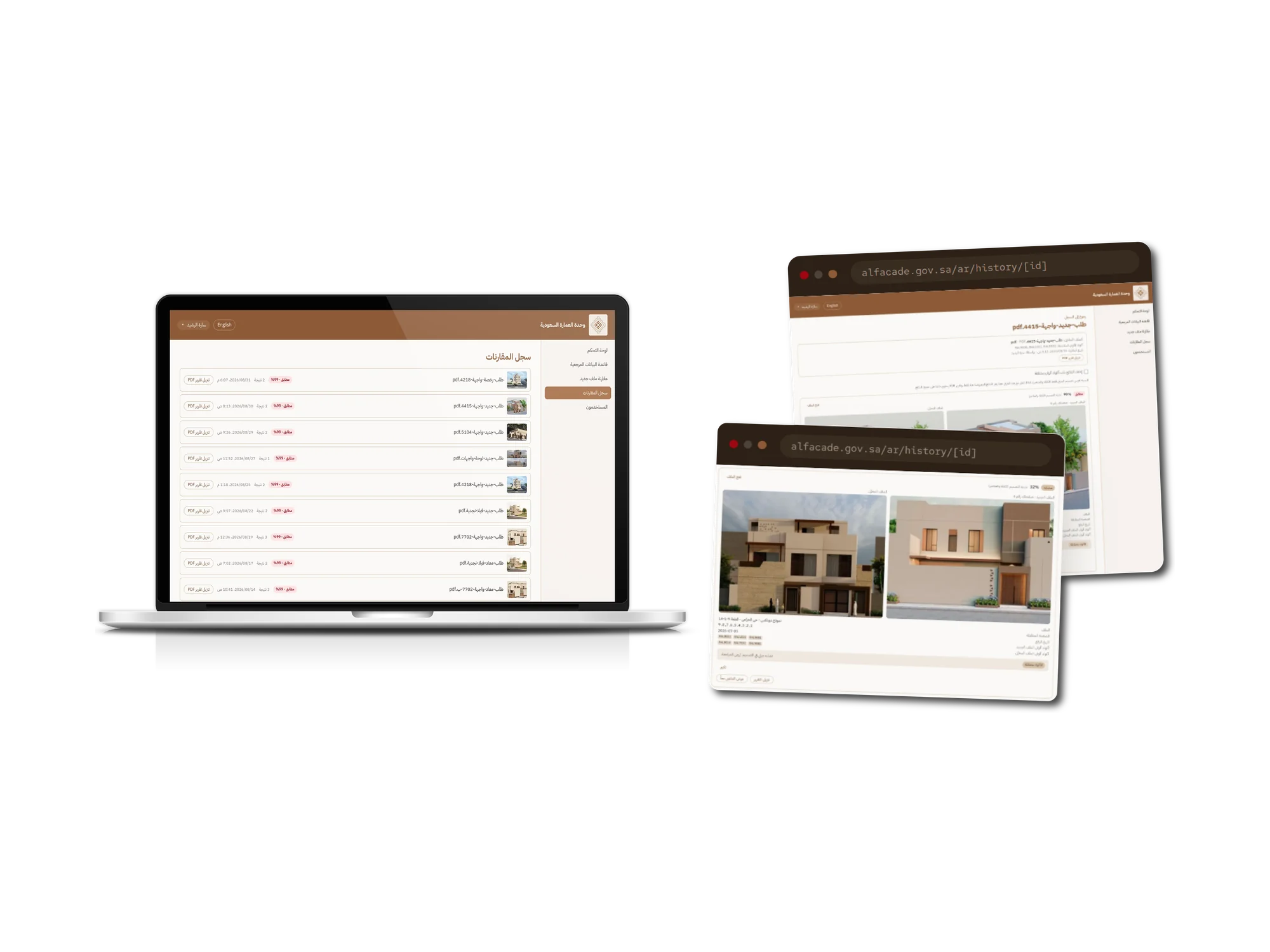
AI Façade Duplicate Detection shown across a laptop and two browser windows
About the product

Every façade, checked against every façade already approved

The architecture unit at a Saudi regional municipality approves the façade designs that get built across the region, and keeps the approved drawings as a permanent reference catalogue. The problem was resubmission: the same façade coming back under a different applicant, a different plot, sometimes a different colour scheme, with no practical way for a reviewer to know. The catalogue was already large enough that checking by eye was not realistic.

We built the whole system: an Arabic-first, right-to-left web application with multiple staff accounts, folders, search, versioning and permit metadata on every record; a Python service that opens a submitted PDF and extracts each façade page as its own indexed image; and an AI comparison engine that scores a new façade against the entire approved catalogue and classifies each result as identical, duplicate, similar or not a duplicate. It runs on a single VPS behind automatic HTTPS, with backups, an operations runbook and Arabic and English user guides shipped alongside it.

For the reviewer, the work that used to be memory and luck is now a screen. They upload the applicant's drawing and get back ranked matches, each one showing their page beside the stored page it matched, the confidence, the paint codes on both sides, and a plain-language verdict. Every check is saved, and every check prints to a branded PDF report that goes into the permit file.

Industry
Government and municipal planning
Platform
Responsive web application, Arabic-first right-to-left with an English toggle
Timeline
About four weeks, June to July 2026
Team
One developer

What we did

  • Product definition and scoping
  • UI/UX design
  • Frontend development
  • Backend development
  • Database design
  • AI and ML engineering
  • DevOps and deployment
  • Documentation

Stack

Next.js 16React 19TypeScriptTailwind CSS v4next-intlAuth.js v5PrismaPostgreSQL 16 with pgvectorPython FastAPIDINOv2 via ONNX RuntimeDocker ComposeCaddy
Goals

What the build had to achieve

Catch the repeat design

The unit needed to know, at review time, whether a façade in front of them was already in the approved catalogue. Everything else in the product exists to make that one question answerable in seconds instead of from memory.

Judge shape, not paint

The client asked directly whether recolouring a façade would defeat detection, and was told it would not. That promise drove the architecture: the visual score is computed on structure alone, with colour handled as a separate, explicit signal.

Show the reasoning, not just the number

A reviewer is making a decision that carries a building permit behind it, so the product never hands them a bare score. Every result carries the matched page numbers, the colour codes on both sides, and a written verdict, and it says plainly when it cannot read a file's codes rather than guessing.

Arabic first, not Arabic translated

The interface is Arabic and right-to-left by default with English as the secondary toggle, down to the printed report and the PDF renderer's font handling. English was never the design that Arabic was fitted into.

Inside the product

AI Façade Duplicate Detection, screen by screen

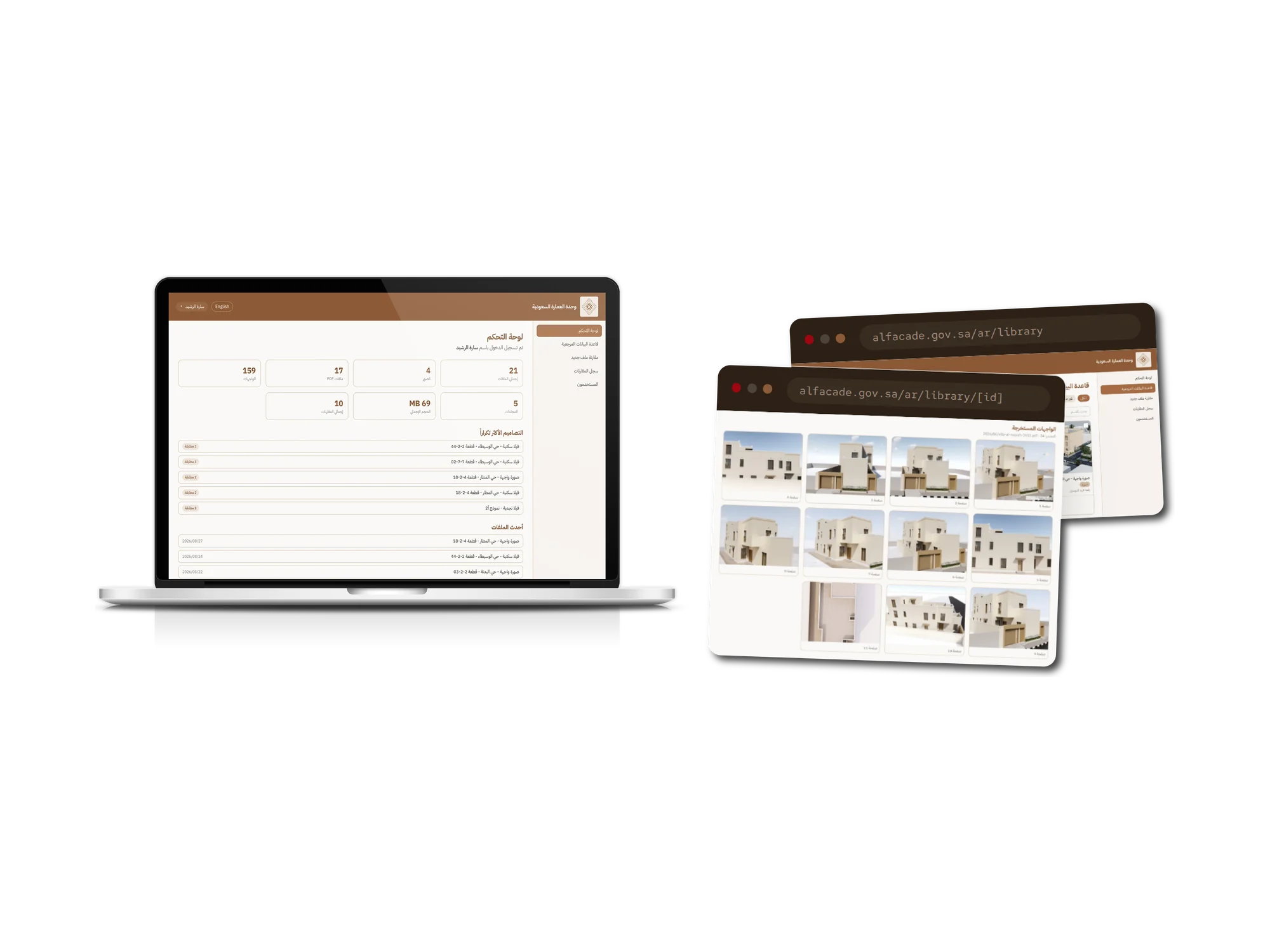
A laptop showing an Arabic right-to-left dashboard with tiles reading 159 façades, 17 PDF files, 4 images, 21 total files, 5 folders, 69 megabytes stored and 10 comparisons run, above a list of the most frequently resubmitted designs each marked with how many matches it has drawn, and a list of the most recent uploads with their dates. Two browser windows beside it show the extracted façades view for a single file, a grid of thirteen separate façade images each numbered and cropped from the same drawing set.
01

Every façade indexed on its own

A submitted drawing set is opened server-side and each façade lifted out as its own indexed image, tied back to its source file and page. In the capture library, 21 files yielded 159 separately searchable façades, one 24-page catalogue contributing 39 of them.

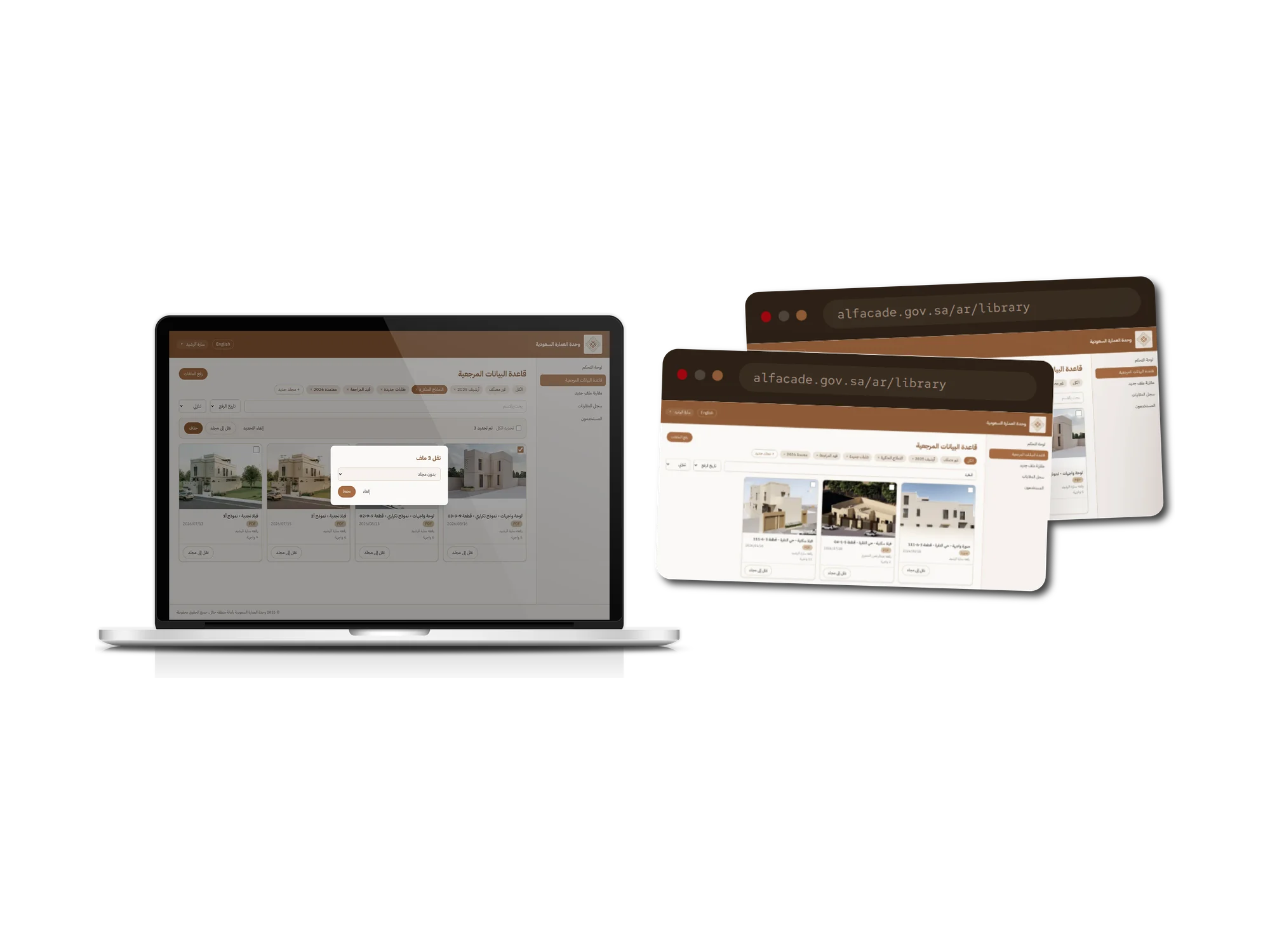
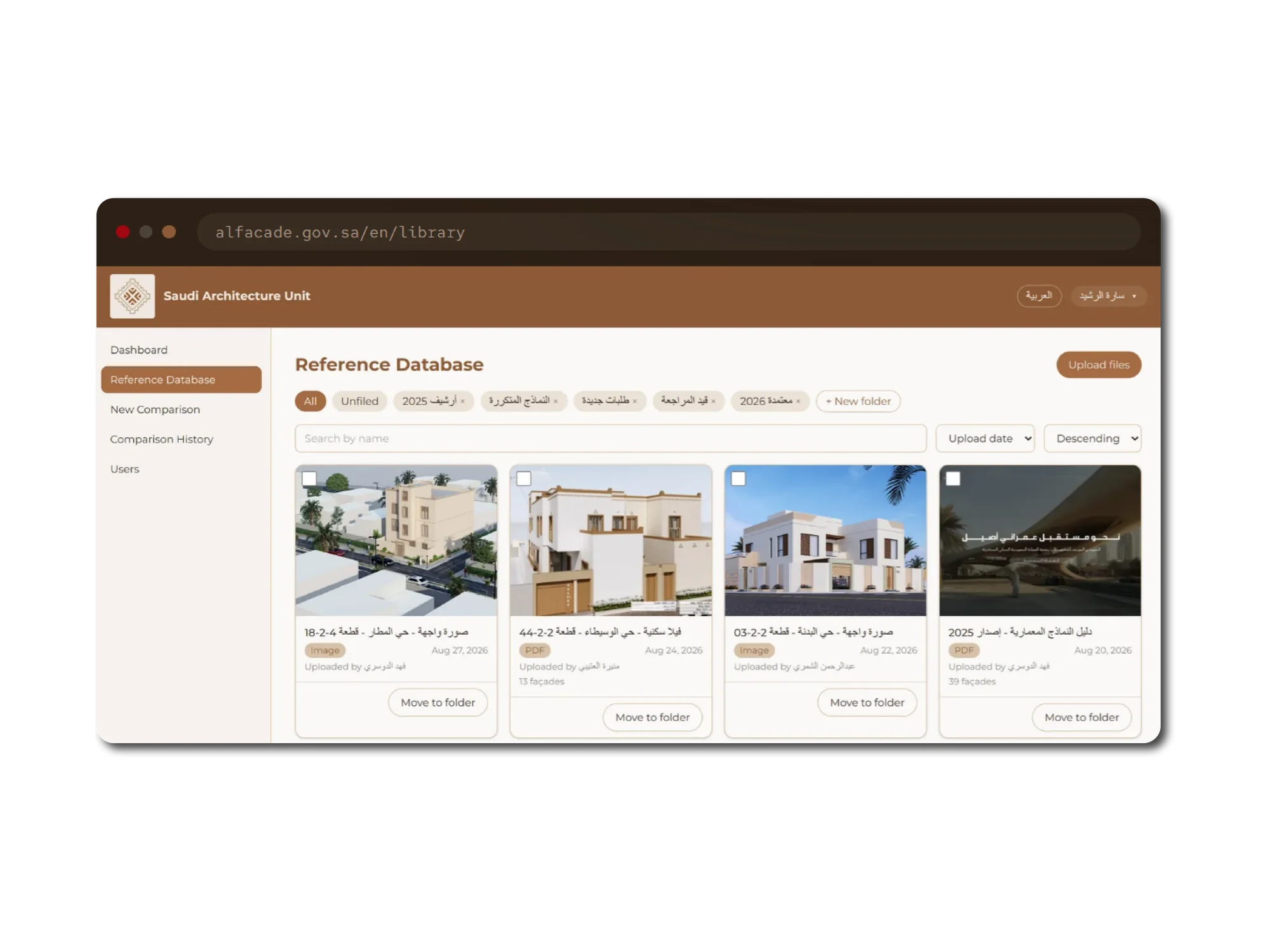
A laptop showing the Arabic reference database screen with folder filter chips for all, unfiled, 2025 archive, repeated models, new requests, under review and approved 2026, a search field and sort controls, over a grid of façade cards each showing its title, plot reference, upload date, uploader and façade count. A move-three-files dialog is open with a destination folder selector. Two browser windows behind it show the same library at different widths.
02

Filed the way the unit works

The approved catalogue, organised into folders by review stage, year and standard model, searchable by district or plot number, with several records refiled or removed in one action.

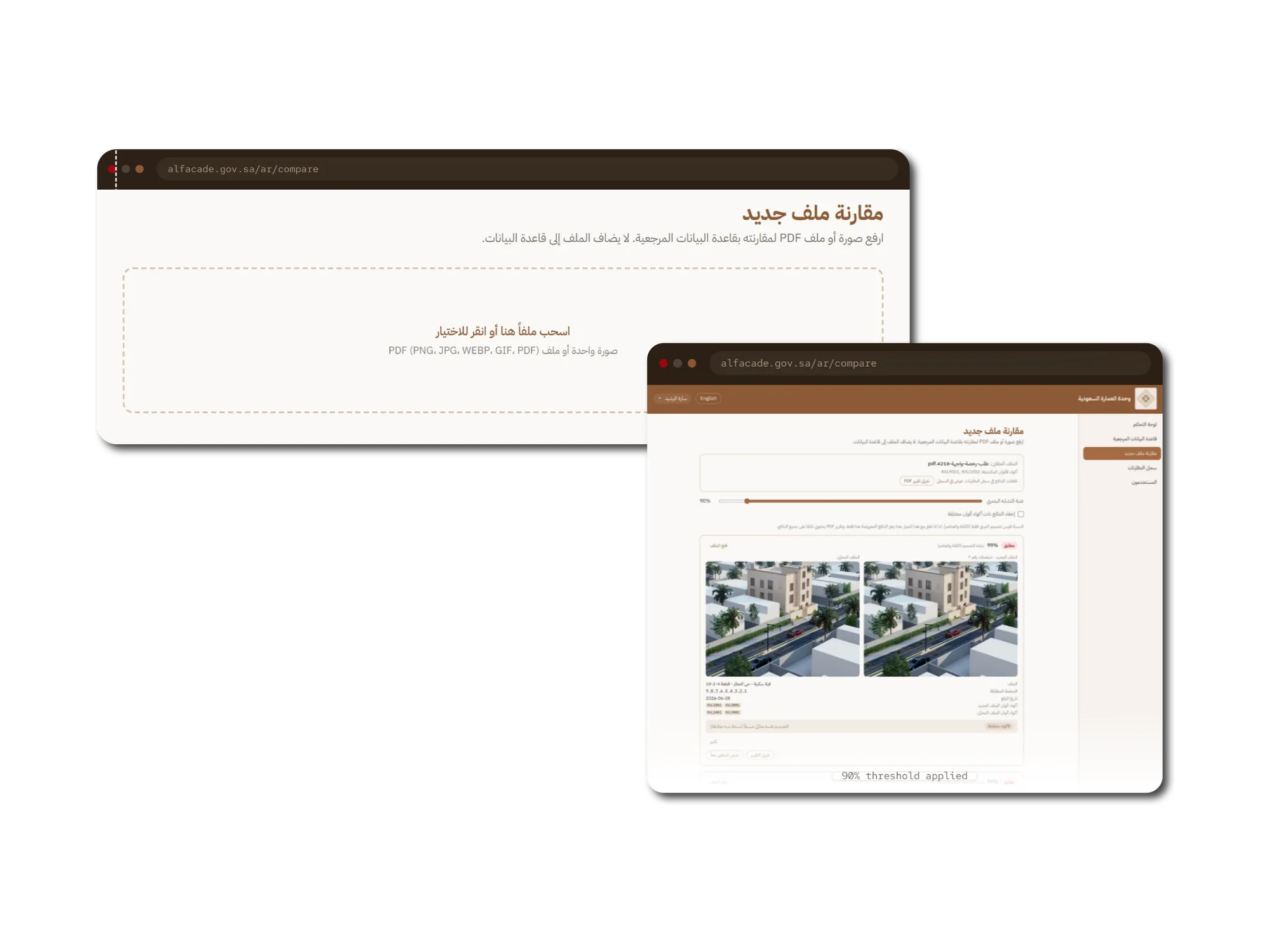
Two browser windows showing the Arabic new-comparison screen. The first is a large dashed dropzone reading drag a file here or click to choose, accepting a single image or PDF. The second shows a completed run with the compared file named at the top, its detected colour codes listed, a similarity threshold slider set to 90 percent, and a first result marked identical at 99 percent design similarity with the submitted page beside the stored page it matched.
03

Compared, never catalogued

The reviewer drops in the applicant's drawing. The page states plainly that the file is compared only and never added to the reference database, and the similarity threshold sets how strict the check is.

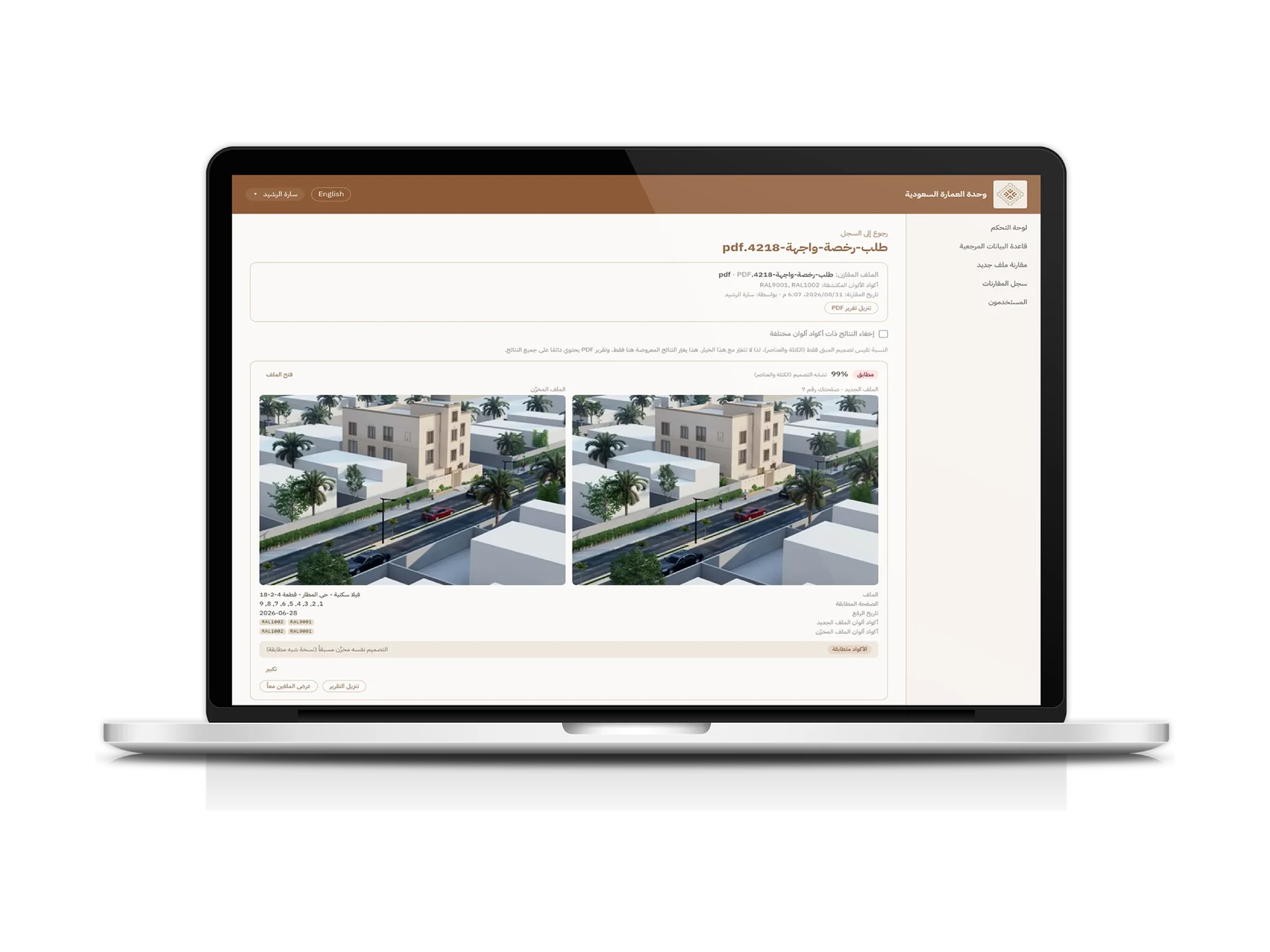
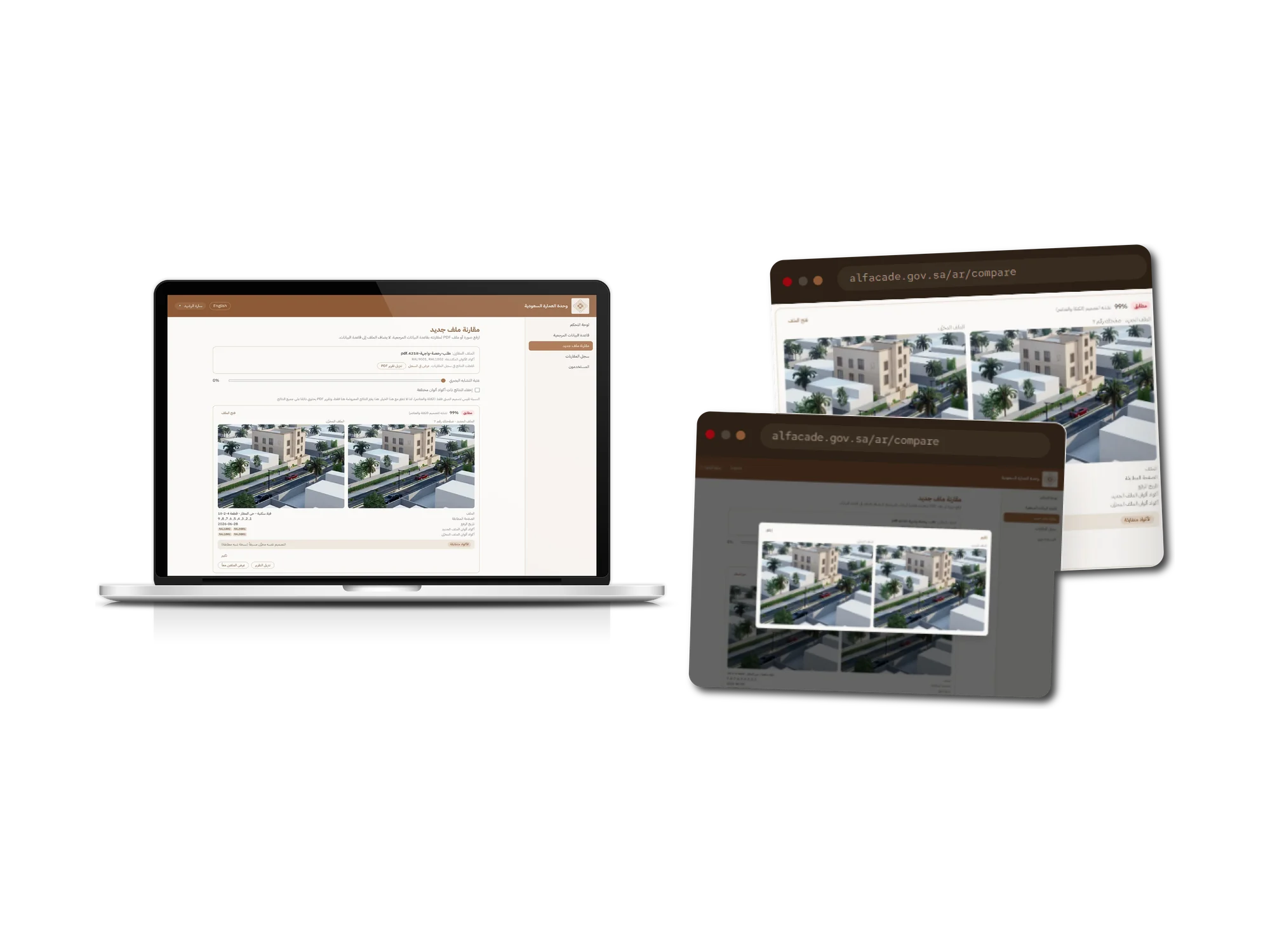
A laptop showing the Arabic comparison workspace with the compared file, its colour codes and a similarity threshold at zero percent, over a result marked identical at 99 percent with two matching architectural renders side by side, the matched page numbers, upload date, and the RAL colour codes recorded on each side. Two browser windows behind it show the same result at a wider zoom and a full-size modal comparing the pair.
04

Ranked matches, with the evidence

Results come back highest first, each one a side-by-side of the submitted page against the stored design it matched, and any pair opens full size so the decision is made on the drawings rather than on a thumbnail.

A laptop showing the Arabic comparison log, a list of every check run by the unit with its file name, date, result count and match percentage, each row offering a PDF report download. Two browser windows beside it show one saved run reopened, with a partial match displayed at 32 percent design similarity between two different villa façades, their differing RAL colour codes listed on each side and a note that the design is partly similar and should be reviewed.
05

A record of every check

Runs are saved with snapshots of the matched file, so a permit decision made months ago can be reopened exactly as it was. A design that is close but not a copy surfaces at 32 percent with its colour codes differing, flagged for a human rather than decided automatically.

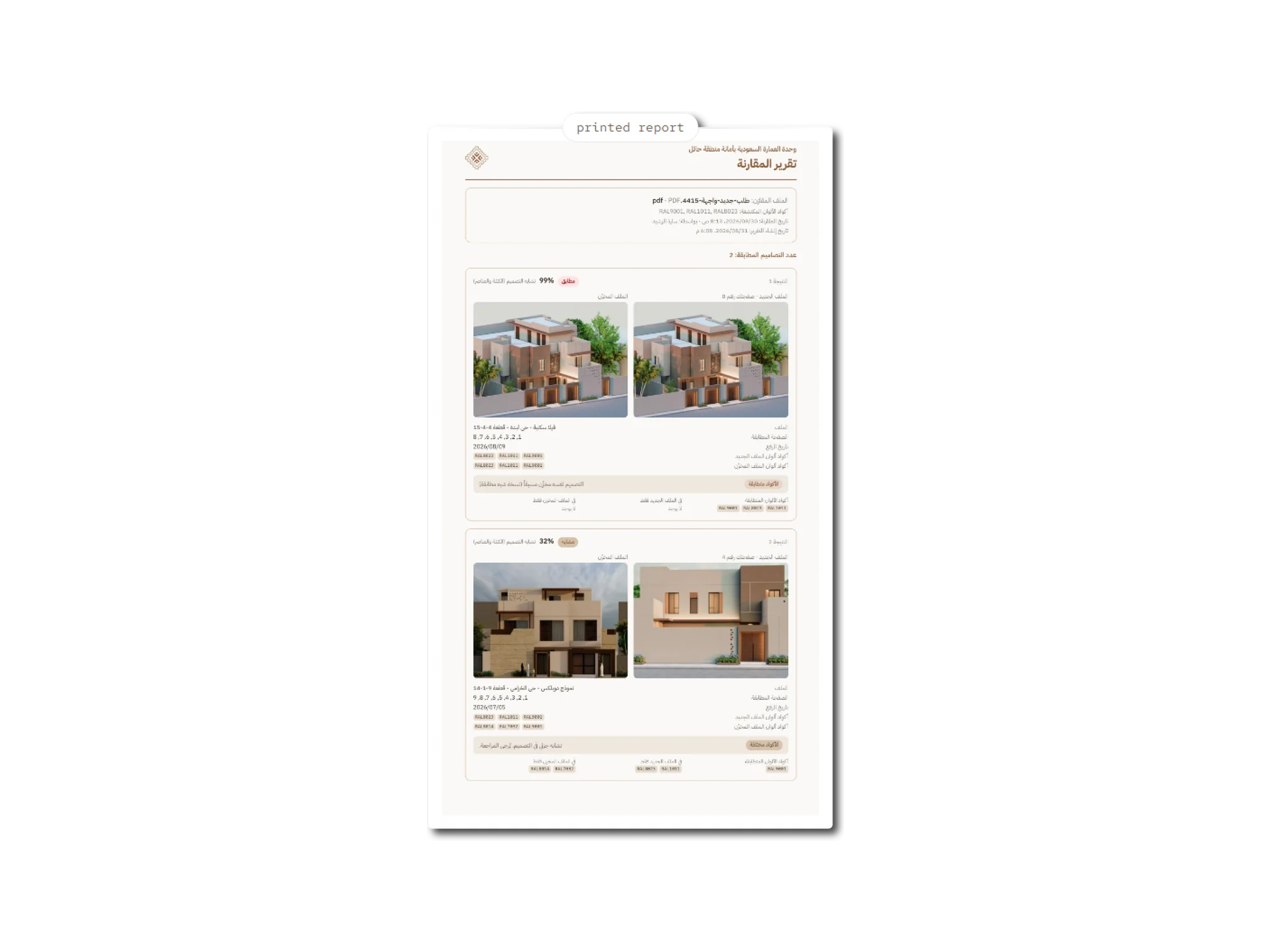
A printed comparison report in Arabic on a portrait page, headed with the unit's logo and wordmark and the title comparison report, listing the compared file, its detected colour codes, the comparison and report dates, and a count of two matching designs. Two result blocks follow: one marked identical at 99 percent with two matching renders side by side and their shared colour codes, and one marked similar at 32 percent with two different façades and a note that the codes differ.
06

The report that goes in the file

A saved run renders to a branded PDF through the app's own print route, so the document is pixel-identical to what the app serves, Arabic fonts and right-to-left layout included, with both façades side by side and the codes that were and were not shared.

A browser window showing the same reference database in English and laid out left to right, with a left sidebar reading Dashboard, Reference Database, New Comparison, Comparison History and Users, a Reference Database heading with an Upload files button, folder filter chips mixing English and Arabic labels, a search by name field with upload date and descending sort controls, and four façade cards each showing its Arabic title, file type, upload date, uploader and façade count above a move to folder button.
07

Arabic first, English second

The interface is Arabic and right-to-left by default with English as the secondary toggle, down to the printed report and the PDF renderer's font handling. English was never the design that Arabic was fitted into.

Challenges

The parts that were genuinely hard

01

Colour could move the score, and we had promised it could not

The problem

The client asked directly whether recolouring a façade would defeat detection, and was told matching runs on structure, not colour. The first engine did not actually honour that: recolouring a render moved the similarity score.

What we did

We rebuilt the engine colour-blind. Images are reduced to luma before the vision model ever sees them, so colour cannot contribute to the visual score at all. Colour did not disappear from the product: it survives as a separate RAL colour-code layer resolved in a fixed precedence order, manual override, then the PDF's text layer, then OCR of the façade images, so a reviewer still sees colour agreement without colour inflating the match. The preprocessing is pinned corpus-wide, because changing it invalidates every stored embedding.

The outcome

A promise made to the client in writing became a property of the code rather than a hope, and the product still answers whether two designs use the same palette as a separate question.
02

Floor plans and colour swatches were polluting the results

The problem

A submitted permit PDF is not a stack of façades. It carries floor plans, colour swatch sheets and the design office's own logo, and those pages sit inside the same size envelope as the façades, so no dimensional rule separates them.

What we did

We trained a small classifier that runs on the same colour-blind embedding the matcher uses, across five classes, with feature standardisation folded into the weights so the raw embedding is fed straight in. A page enters retrieval only if the probability it is a façade clears a high threshold. Two cheaper exclusions run before it: an exact-bytes hash that drops repeated boilerplate frames, and an edge-density floor that drops near-black rasters. Inference is a matrix multiply and a softmax, so no new runtime dependency.

The outcome

Only genuine façade pages reach the comparison, and the gate's own documentation is careful not to overclaim: its accuracy figure is recorded explicitly as a measurement on our data, not a forecast on theirs.

03

A raw cosine distance is not a number a reviewer can act on

The problem

The engine's native output is a cosine distance between two vectors. Showing that to a permit reviewer as a percentage would be dishonest, because the numbers are not linear and 0.87 does not mean 87 percent confident.

What we did

We fitted a calibration curve so the number on screen is a same-design confidence rather than a bare distance, and set the classification tiers on that calibrated probability. Identical deliberately stays on the raw distance, because identical means the pixels match, not that the design is probably the same. On top of that sits a client-confirmed rule: a duplicate needs the confidence floor and matching colour codes, and matching codes never promote a pair that failed the floor.

The outcome

The percentage a reviewer reads means something specific and defensible, and the rule that turns it into a verdict was agreed with the client rather than assumed.

04

More sensitivity without flooding the reviewer

The problem

The client asked for near-misses to surface for review, not only near-identical files. Lowering a similarity floor is trivial; lowering it without burying a reviewer under look-alikes is not.

What we did

We sized the new floor from a census of the real library rather than by taste. At one threshold a query produced a median of one and a ninetieth-percentile of six extra cards, while a looser one flooded at a median of twelve. The tighter figure shipped as the default. Everything above the original surface floor keeps the untouched fitted curve, so no previously validated number moved, and the new band's percentages are documented as a position within the band rather than dressed up as calibrated confidences. The environment override is clamped as a fat-finger guard.

The outcome

Sensitivity became a tuned, evidenced setting with a documented cost, not a constant someone lowered until the demo looked good.

05

A permission model that could not lock the client out

The problem

The unit asked to restrict editing to whoever uploaded a file. Applied literally to a library that already existed, that rule would have frozen most of the catalogue overnight, because the unit files by person and several of those people had no account.

What we did

The rule is enforced server-side on all four mutating routes, with a pure decision helper that is unit-testable away from request handling. A configurable cutoff timestamp grandfathers everything uploaded before a chosen instant, so an existing archive stays workable while every new upload is owner-or-admin from day one. The end-to-end test seeds two non-admin accounts on purpose, because every other test signs in as the admin, who is both an administrator and the uploader of everything, so a backwards gate would have passed silently.

The outcome

A security rule that shipped without a migration and without a day where the client could not edit their own library.

Approach

How the work ran

  1. 01

    Discovery and research

    We started from the client's own conversation and their sample files, and reconciled the two into a locked scope document recording what was sold, what was explicitly excluded, and which decisions the client confirmed. That document stayed the reference for the whole build, and disagreements were resolved against it rather than against memory.

  2. 02

    UI/UX design

    Arabic and right-to-left came first, on the client's own brand: the login screen was rebuilt to their mockup and their logo, and the interface carries 203 translated message keys mirrored across Arabic and English, with layout handled through logical CSS properties so both directions mirror from one rule rather than two. The app opens at the login screen with no marketing page, exactly as specified.

  3. 03

    Development and testing

    Delivery was phased and demoed phase by phase, as sold. Testing is real rather than decorative: 245 unit tests across 21 files and 21 end-to-end Playwright specs covering authentication, login lockout, upload, bulk actions, replace-with-version-history, folders, comparison, history, the PDF report, permissions and responsive layout. Accuracy is fixture-driven, with a labelled corpus and pair fixtures held in code so the engine's behaviour is asserted rather than eyeballed.

  4. 04

    Deployment and support

    The system runs as a four-service Docker Compose stack on a single VPS, the app, the Python extractor, PostgreSQL with pgvector, and Caddy terminating automatic HTTPS, provisioned by a setup script. It ships with a deployment guide, an operations runbook covering incident response and restore drills, nightly backup and restore scripts plus an in-app backup download, and Arabic and English user guides for the unit's staff.

Features

What shipped

Automatic façade extraction from permit PDFs

A submitted drawing set is opened server-side and every façade lifted out as its own indexed image, tied to its source file and page number, with repeated boilerplate frames and near-black rasters excluded at extraction. Multi-façade sheets are split rather than stored whole.

Colour-blind matching over a vector index

Each façade is embedded once with a DINOv2 vision model running on CPU through ONNX Runtime, stored as a 384-dimension vector in PostgreSQL with pgvector, and searched with an HNSW index. Only the file being checked is embedded live.

Four-way classification with an adjustable threshold

Every result is labelled identical, duplicate, similar or not a duplicate, ranked highest first, with a similarity threshold the reviewer controls and an option to hide matches whose colour codes differ.

Matched-pair provenance

Each result records which page of the submitted file produced the match and which page of the stored file it matched, so the side-by-side shows the real pair rather than page one against everything.

History that survives the library changing

Runs are saved with snapshots of the matched file's name, codes and upload date, and the foreign keys are set to null rather than cascading when a reference file is later deleted or replaced, so a historic decision degrades to its snapshot instead of vanishing.

Printable, branded PDF reports

A saved run renders to a PDF through the app's own print route, driven by headless Chromium against a short-lived signed token, so the document is pixel-identical to what the app serves, Arabic fonts and right-to-left layout included, and every image is inlined rather than fetched.

Results

Measured, not estimated

159 façades

From 21 uploaded files

In the capture environment, one 24-page catalogue alone contributed 39. Each façade is matchable on its own rather than buried inside a PDF.

245 tests

Across 21 files, in 4 seconds

Alongside 21 end-to-end browser specs covering every user-facing flow including permissions and the printed report, with accuracy asserted against a labelled corpus rather than eyeballed.

4 services

Shipped as an operable system

A containerised stack with one-command provisioning, automatic HTTPS, nightly backups plus an in-app backup download, an incident runbook, and Arabic and English user guides. Not a handover of source.

Have a decision buried in a pile of documents?

From messy real-world files to a system your team can defend in front of an applicant. Tell us what your reviewers are checking by hand.

Have a Project To Discuss?

Contact Us